 Cart
Cart
|
Home > Online Product Documentation > Table of Contents > Filtering Results of Queries Filtering Results of QueriesSometimes you want to retrieve only those elements that meet a certain condition. For example, you might want information about a particular book. In this case, you can include a filter in your query. You enclose filters in brackets ( [ ] ). The following figure shows how the XPath processor interprets a query with a filter: 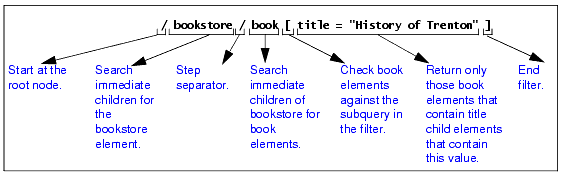
This query checks each
The following topics provide details about filters: Quotation Marks in FiltersSuppose you define the following filter:
If you need to specify this filter as part of an attribute value, use single quotation marks instead of double quotation marks. This is because the attribute value itself is (usually) inside double quotation marks. For example:
Strings within an expression may contain special characters such as [, {, &, `, /, and others, as long as the entire string is enclosed in double quotes ("). When the string itself contains double quotes, you may enclose it in single quotes ('). When a string contains both single and double quotes, you must handle these segments of the string as if they were individual phrases, and concatenate them. More Filter Examples
Following is another example of a query with a filter clause. This query returns
The next query returns
The next query returns the
The next query returns
How the XPath Processor Evaluates a FilterYou can apply constraints and branching to a query by specifying a filter clause. The filter contains a query, which is called the subquery. The subquery evaluates to a Boolean value, or to a numeric value. The XPath processor tests each element in the current context to see if it satisfies the subquery. The result includes only those elements that test true for the subquery.
The XPath processor always evaluates filters with respect to a context. For example, the expression
The next query returns all titles of books in the current context that have at least one excerpt:
Multiple Filters
You can specify any number of filters in any level of a query expression. Empty filters
A query that contains one or more filters returns the rightmost element that is not in a filter clause. For example:
The previous query returns
The following query finds each
The next query returns all books in the current context that have an excerpt and a title:
Filters and Attributes
Following is a query that finds all child elements of the current context with
The following query returns all
The next query finds all
|

XML PRODUCTIVITY THROUGH INNOVATION ™


