|
|
Home > Online Product Documentation > Table of Contents > How to Run a Scenario How to Run a ScenarioTo run a scenario:
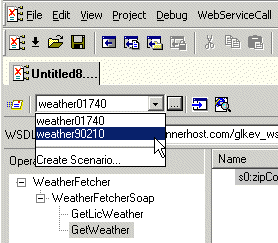
1. Select a scenario from the scenario drop-down list at the top of the editor window:
Alternative:
a. In the Web Service Call Composer tool bar, click
Stylus Studio displays the Scenario Properties dialog box.
b. On the
General tab, select the scenario you want to run from the
Existing preview scenarios list.
c. Click
OK.
2. Click the
Send Request button (
|
Database-to-XML Mapping
Stylus Studio features several database-to-XML mapping tools that allow you to easily query a relational database using SQL/XML or SQL and render the results as XML. Stylus Studio also supports the world's first and only visual SQL/XML Editor!
Web Service Standards
Stylus Studio supports Web service standards including WSDL, UDDI and SOAP. The Web Service Tester lets you easily develop and leverage Web services in your XML applications.
DTD Parser
Learn about the powerful DTD parser technologies that are supported in Stylus Studio's DTD tools, including DOM and SAX based DTD parsing components.
Apache FOP
Apache FOP is an open-source engine is available from the Apache project that renders XSL-FO into PDF and other popular document formats. Apache FOP is fully integrated with Stylus Studio's XSL:FO tools.