Cart
Cart
|
Home > Online Product Documentation > Table of Contents > Showing/Hiding Toolbar Groups Showing/Hiding Toolbar GroupsToolbar groups are displayed by default. Use this procedure to hide/re-display them.
To hide/show a toolbar group:
1. Display the
Customize dialog box (
Tools > Customize).
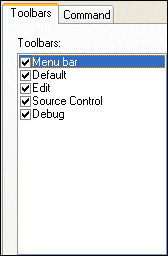
2. In the
Toolbars group box, deselect the check box of the group you want to hide.
The toolbar is dropped from the Stylus Studio window.
3. To re-display a hidden toolbar group, reselect the check box.
|

XML PRODUCTIVITY THROUGH INNOVATION ™