|
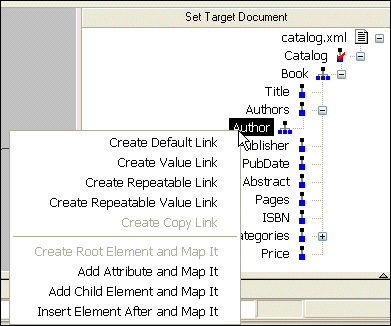
Home >Online Product Documentation >Table of Contents >Left and Right Mouse Buttons Explained Left and Right Mouse Buttons ExplainedYou can use either the left or the right mouse button to perform the drag and drop operation used to create source-target mappings in the XSLT mapper. If you use the left mouse button to perform the drag operation, the link always maps the source node to the target node without making any changes to the target structure. If you use the right mouse button, Stylus Studio displays a shortcut menu that provides you with alternatives for modifying the target structure. Using this menu, you can
|

DTD Parser
Learn about the powerful DTD parser technologies that are supported in Stylus Studio's DTD tools, including DOM and SAX based DTD parsing components.
Using Stylus Studio with RenderX XEP
RenderX XEP is a production-quality engine that converts XSL:FO into PDF or PostScript files. You can use RenderX XEP in place of the Apache FOP engine to render PDF files from Stylus Studio.
Stylus Studio's Advanced XQuery Mapper Features
Learn how to create an advanced XQuery expression in the XQuery mapper, specifying operations, constants, and ports, for use in conditional blocks and FLWR expressions. Free online video demonstration!
EXSLT Tools
EXSLT support in Stylus Studio lets you extend XSLT 1.0 stylesheets and simplify many tasks including computing dates and times, performing mathematical computations, string manipulations and more.