What Is a Stylesheet?

A stylesheet is an XML document that contains instructions for generating a new document based on information in the source document. This can involve adding, removing, or rearranging nodes, as well as presenting the nodes in a new way.

This following topics provide more information:

Example of a Stylesheet

When you work with a stylesheet, three documents are involved:

For example, suppose you have the following XML document:

<?xml version="1.0"?> 
<bookstore> 
<book> 
<author>W. Shakespeare</author> 
<title>Hamlet</title> 
<published>1997</published> 
<price>2.95</price> 
</book> 
<book> 
<author>W. Shakespeare</author> 
<title>Macbeth</title> 
<published>1989</published> 
<price>9.95</price> 
</book> 
<book> 
<author>D. Alighieri</author> 
<title>The Divine Comedy</title> 
<published>1321</published> 
<price>5.95</price> 
</book> 
</bookstore>

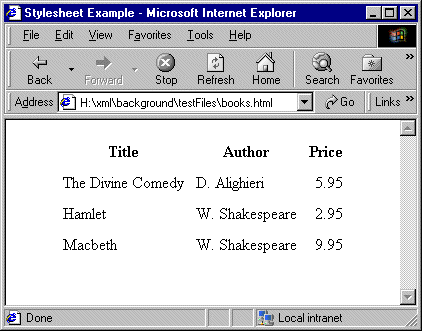
You can use a stylesheet to transform this XML document into an HTML document that appears as follows in a Web browser:

The Web page in Figure 188 is defined by the following HTML document:

<html> <head> <title>Stylesheet Example</title> </head> 
<body> <table align="center" cellpadding="5"> 
<tr><th>Title</th><th>Author</th><th>Price</th></tr> 
<tr><td>The Divine Comedy</td><td>D. Alighieri</td> 
<td align="right">5.95</td></tr> 
<tr><td>Hamlet</td><td>W. Shakespeare</td>
<td align="right">2.95</td></tr> 
<tr><td>Macbeth</td><td>W. Shakespeare</td>
<td align="right">9.95</td></tr> 
</table> </body> </html>

The HTML document contains HTML markup that is not in the source document. In the HTML document, the data from the source document is not in the same order as it is in the XML source document. Also, this HTML document does not include some data that is in the XML source document. Specifically, the HTML document does not include information about the date of publication (the published elements).

To create this HTML file, the stylesheet contains two templates that provide instructions for

Following is a stylesheet that does this.

<?xml version = "1.0"> 
<xsl:stylesheet xmlns:xsl= 
	"http://www.w3.org/1999/XSL/Transform" 
	version="1.0"> 
<xsl:output method="html"/> 
<xsl:template match="/"> 
	<html> <head> 
	<title>Stylesheet Example</title></head> 
	<body> 
	<table align="center" cellpadding="5"> 
	<tr> 
	<th>Title</th> 
	<th>Author</th> 
	<th>Price</th></tr> 
	<xsl:apply-templates  
		select="/bookstore/book"> 
		<xsl:sort select="author"/> 
	</xsl:apply-templates> 
	</table> 
	</body> 
	</html> 
</xsl:template> 
<xsl:template match="book"> 
	<tr> 
	<td><xsl:value-of select="title"/></td> 
	<td><xsl:value-of select="author"/></td> 
	<td align="right"> 
		<xsl:value-of select="price"/> 
	</td> 
	</tr> 
</xsl:template> 
</xsl:stylesheet> 

About Stylesheet Contents

Stylesheets are XML documents. They contain a combination of

Each XSLT element is an instruction to the XSLT processor. For information about all XSLT instructions, see XSLT Instructions Quick Reference.

The root element of a stylesheet must declare a namespace that associates a prefix with the URI for an XSLT processor. The URI in the namespace declaration in the previous example identifies the W3C standard XSLT processor. This declaration, shown again below, instructs the XSLT processor to recognize the XSLT elements and attributes by their xsl prefix:

xmlns:xsl="http://www.w3.org/1999/XSL/Transform" 

In this stylesheet, you must use the xsl prefix for all XSLT instructions.

When you write a stylesheet, you specify the actions you want the XSLT processor to perform when it processes a particular source node. To do this, you define XSLT templates, which are described in the next section.

XSLT Editor

Stylus Studio's XSLT Editor is the most advanced XSLT development tool on the market. This powerful tool provides backmapping, XSLT transformation preview, debugging, peformance profiling, and more!

WYSIWYG XSLT Designer

Stylus Studio's powerful and easy-to-use WYSIWYG ("What you see is what you get") XSLT Designer lets you create XSLT stylesheets without writing any code! Go from a blank slate to solid, robust XSLT in minutes, using simple drag-and-drop operations.

MSXML - Microsoft XML Tools

MSXML tools in Stylus Studio feature integrated XML validation, XSLT transformation and XSLT debugging using the Microsoft's COM-based XML processing components: MSXML 3.0, MSXML 4.0 and MSXML 6.0

XML Schema Documentation Generator

Stylus Studio's XML Schema Editor includes an integrated XML Schema documentation generator, allowing you to easily publish XML content models defined in XML Schema in a convenient, HTML format. A screenshon of the XML Schema Editor is shown here.

Stylus Most Wanted

 
Free Stylus Studio XML Training:
W3C Member