|
Home >Online Product Documentation >Table of Contents >Creating a Stylesheet from HTML Creating a Stylesheet from HTMLYou can create an XSLT stylesheet from an HTML file using the HTML to XSLT document wizard.
To run the HTML to XSLT document wizard:
1. Select File > Document Wizards from the menu.
The Document Wizards dialog box appears.
2. Click the XSLT Editor tab.
3. Double-click HTML to XSLT (or select the HTML to XSLT icon and click OK).
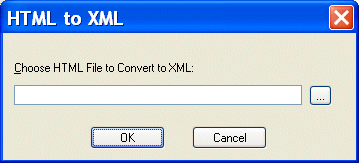
The HTML to XML dialog box appears.
4. Enter the name of the HTML file you want to convert to XSLT in the Choose HTML File to Convert to XSLT field.
5. Click OK.
Stylus Studio opens the converted HTML file as an untitled XSLT file in the XSLT Editor. |

Mail, Package & Freight Delivery
Want to know what mail, package & freight delivery companies are shipping away there XML woes? Now you can! Check out these top mail, package & freight delivery companies that are packaged with the power of Stylus Studio.
Using DTD in Microsoft Applications
Learn how to integrate DTD's into your Microsoft applications using MSXML or System.XML DTD processing components.
XQuery Functions - User Defined Functions in XQuery
Dr. Michael Kay's tutorial entitled: 'Defining your own Functions in XQuery' explains how to write powerful User Defined Functions in XQuery.
XML Notepad
XML Notepad simplifies building of XML applications, allowing authors to rapidly build and edit their XML files. With XML Notepad, you can create XML document prototypes quickly, easily, using an intuitive graphical interface.