|
Home >Online Product Documentation >Table of Contents >Creating a ddtek:wscall Function Creating a ddtek:wscall FunctionTo create a ddtek:wscall function in XQuery Mapper:
1. Open an XQuery and click the Mapper tab.
2. Right-click the Mapper canvas and select Function Block > DataDirect XQuery > wscall/2.
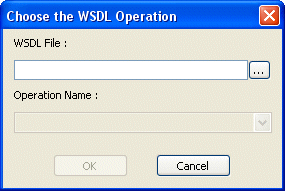
Stylus Studio displays the Choose the WSDL Operation dialog box.
3. Enter the URL of the WSDL whose operation you want your XQuery to execute in the WSDL File field.
Example:
Stylus Studio displays the operations associated with the Web service represented by the WSDL in the Operation Name field.
4. Choose the Web service operation you want your XQuery to execute from the Operation Name field.
Example:
5. Click OK.
Stylus Studio displays the
The illustration shown in Figure 344 shows a |

Why XQuery - The Case for XQuery
Read "The Case for XQuery" - an article that debuted in the November 2005 issue of SOA WebServices Journal, written by Jerry King, Vice President of DataDirect Technologies.
WYSIWYG XSLT Designer
Stylus Studio's powerful and easy-to-use WYSIWYG ("What you see is what you get") XSLT Designer lets you create XSLT stylesheets without writing any code! Go from a blank slate to solid, robust XSLT in minutes, using simple drag-and-drop operations.
XQuery Editor
Stylus Studio's XQuery development tools are a tremendous help in building and testing XML applications requiring a standards-based approach to querying, integrating and transforming data from various distributed data sources.
XML Spell Checker
The Stylus Studio Spell Checker is integrated with our intuitive XML Text Editor. It highlights typographical errors as you type and lets you easily search, replace, and build custom dictionaries.