Home >Online Product Documentation >Table of Contents >The Principal Parts of an XQuery FLWOR Expression
The Principal Parts of an XQuery FLWOR Expression
The name FLWOR comes from the five clauses that make up a FLWOR expression: for, let, where, order by, and return. Most of these clauses are optional: the only clause that is always present is the XQuery return clause (though there must be at least one XQuery for or let clause as well). To see how FLWOR expressions work, we will build up our understanding one clause at a time.
F is for For
The behavior of the for clause is fairly intuitive: it iterates over an input sequence and calculates some value for each item in that sequence, returning a sequence obtained by concatenating the results of these calculations. In simple cases there is one output item for every input item. So, this FLWOR expression:
returns the sequence (1, 4, 9, 16, 25, 36, 49, 64, 81, 100). In this example, the input items are simple numbers, and the output items are also simple numbers. Numbers are an example of what XQuery calls atomic values; other examples are strings, dates, booleans, and URIs. But the XQuery data model allows sequences to contain XML nodes as well as atomic values, and the for expression can work on either.
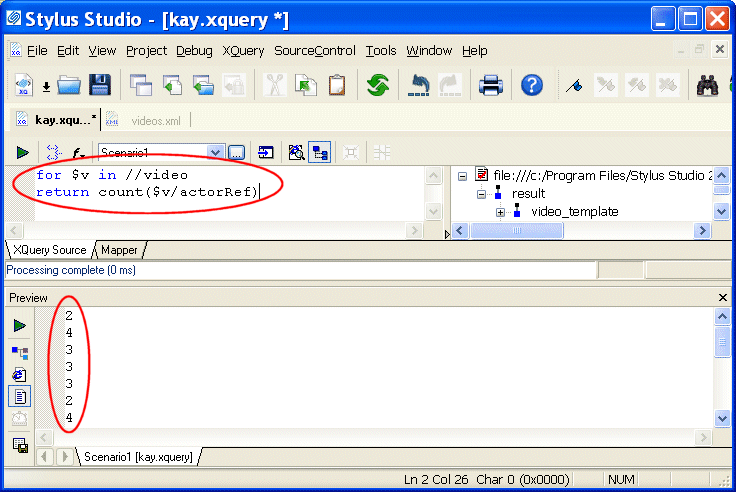
Here is an example that takes nodes as input, and produces numbers as output. It counts the number of actors listed for each video in a data file:
You can run this in Stylus Studio or in Saxon, using the example videos.xml file as input. (Tips on setting up these tools are described in the previous section, An XQuery Primer.) Here's the output from Stylus Studio:
|
Figure 289. FOR Clause in a FLWOR Expression
The Preview window shows the result: a rather mundane sequence of numbers (2, 4, 3, 3, 3...).
This gives us a good opportunity to point out that a FLWOR expression is just an expression, and you can use it anywhere an expression is allowed: it doesn't have to be at the top level of the query. There is a function, avg(), to compute the average of a sequence of numbers, and we can use it here to find the average number of actors listed for each of the movies in our data file:
The answer is 2.2941176 and a bit - the number of decimal places shown will depend on the XQuery processor that you use. If you are only interested in the answer to two decimal places, try:
which gives a more manageable answer of 2.29. (The strange name round-half-to-even is there to describe how this function does rounding: a value such as 2.145 is rounded to the nearest even number, in this case 2.14.) This is all designed to demonstrate that XQuery is a functional language, in which you can calculate a value by passing the result of one expression or function into another expression or function. Any expression can be nested inside any other, and the FLWOR expression is no exception.
If you are coming from SQL, your instinct was probably to try and do the averaging and rounding in the return clause. But the XQuery way is actually much more logical. The return clause calculates one value for each item in the input sequence, whereas the avg() function applies to the result of the FLWOR expression as a whole.
As with some of the examples in An XQuery Primer, XPath 2.0 allows you to write this example using path expressions alone if you prefer:
We have seen a for expression that produces a sequence of numbers from another sequence of numbers, and we have seen one that produces a sequence of numbers from a sequence of selected nodes. We can also turn numbers into nodes: the following query selects the first five videos.
And we can get from one sequence of nodes to another sequence of nodes. This example shows all the actors that appear in any video:
In fact, this last example probably represents the most common kind of for expression encountered, but we introduced it last to avoid leaving you with the impression that it is the only kind there is.
Once again, you could write this example as an XPath expression:
However, this time the two expressions are not precisely equivalent. Try them both in Stylus Studio: the FLWOR expression produces a list containing 38 actors, while the list produced by the path expression contains only 36. The reason is that path expressions eliminate duplicates, and FLWOR expressions do not. Two actors are listed twice because they appear in more than one video.
The FLWOR expression and the "/" operator in fact perform quite similar roles: they apply a calculation to every item in a sequence and return the sequence containing the results of these calculations. There are three main differences between the constructs:
- The
for expression defines a variable $v that is used in the return clause to refer to each successive item in the input sequence; a path expression instead uses the notion of a context item, which you can refer to as "." In this example, //video is short for ./root()//video, so the reference to the context item is implicit. - With the "
/" operator, the expression on the left must always select nodes rather than atomic values. In the earlier example //video/count(actorRef), the expression on the right returned a number - that's a new feature in XPath 2.0 - but the left-hand expression must still return nodes. - When a path expression selects nodes, they are always returned in document order, with duplicates removed. For example, the expression
$doc//section//para will return each qualifying <para> element exactly once, even if it appears in several nested <section> elements. If you used the nearest-equivalent FLWOR expression, for $s in $doc//section return $s//para, then a <para> that appears in several nested sections would appear several times in the output, and the order of <para> elements in the output will not necessarily be the same as their order in the original document.
The for clause really comes into its own when you have more than one of them in a FLWOR expression. We will explore that a little later, when we start looking at joins. But first, let's take a look at the other clauses: starting with let.
L is for Let
The XQuery let clause simply declares a variable and gives it a value:
Hopefully the meaning of that is fairly intuitive. In fact, in this example you can simply replace each variable reference by the expression that provides the expression's value. This means that the result is the same as this:
In a for clause, the variable is bound to each item in the sequence in turn. In a let clause, the variable only takes one value. This can be a single item or a sequence (there is no real distinction in XQuery - an item is just a sequence of length one). And of course the sequence can contain nodes, or atomic values, or (if you really want) a mixture of the two.
In most cases, variables are used purely for convenience, to simplify the expressions and make the code more readable. If you need to use the same expression more than once, then declaring a variable is also a good hint to the XQuery processor to only do the evaluation once.
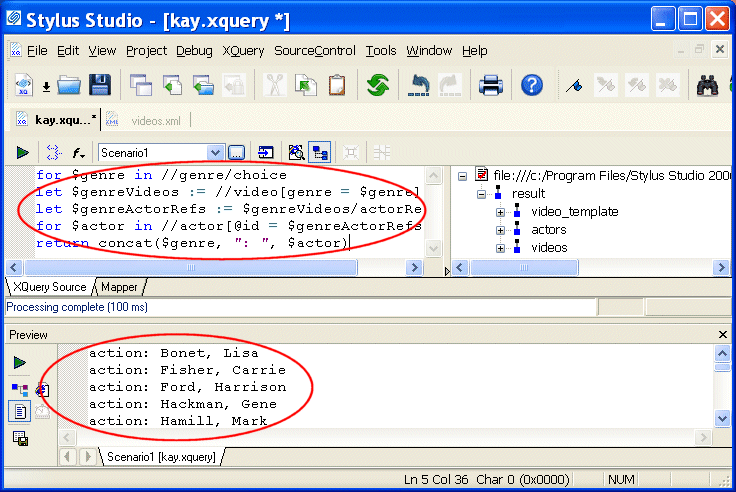
In a FLWOR expression, you can have any number of for clauses, and any number of let clauses, and they can be in any order. For example (returning to the videos.xml data again), you can do this:
To understand this, just translate it into English:
For each choice of genre, let's call the set of videos in that genre $genreVideos. Now let's call the set of references to all the actors in all those videos $genreActorRefs. For each actor whose ID is equal to one of the references in $genreActorRefs, output a string formed by concatenating the name of the genre and the name of the actor, separated by a colon.
Here is the result in Stylus Studio:
|
Figure 290. LET Clause in a FLWOR Expression
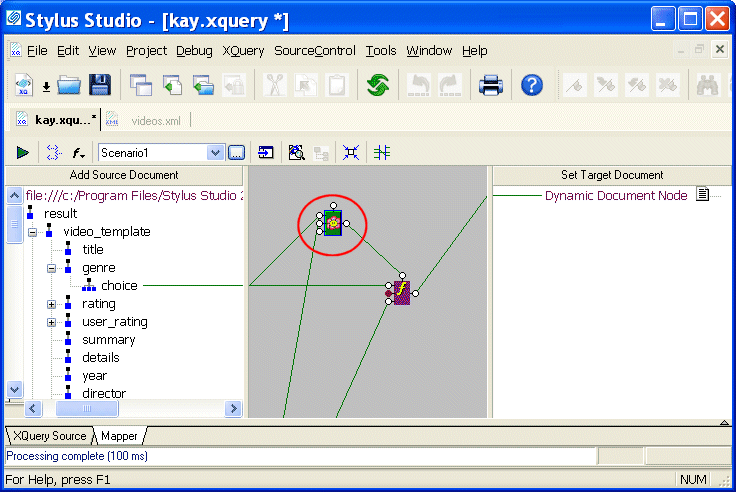
As a quick aside, the Stylus Studio XQuery Mapper allows you to visually map from one or more XML input documents to any target output format. In a nutshell - click on the Mapper tab on the bottom of the XQuery Editor. Next, click Add Source Document and add your source document(s). Our last XQuery would look like this in the XQuery Mapper:
|
Figure 291. Simple FLWOR Shown in XQuery Mapper
The FLWOR block is graphically represented as a function block with three input ports going into it on the left (For, Where, Order By), a flow control port on the top, and an output port on the right. As you draw your XML mappings, Stylus Studio writes the XQuery code; similarly, you can edit the XQuery code manually and Stylus Studio which will update the graphical model - both views of the XQuery are kept synchronized. See Building an XQuery Using the Mapper for more information on the Mapper module.
One important thing to note about variables in XQuery (you can skip this if you already know XSLT, because the same rule applies there): variables cannot be updated. This means you cannot write something like let $x := $x+1. This rule might seem very strange if you are expecting XQuery to behave in the same way as procedural languages such as JavaScript. But XQuery is not that kind of language, it is a declarative language and works at a higher level. There are no rules about the order in which different expressions are executed (which means that the little yellow triangle that shows the current execution point in the Stylus Studio XQuery debugger and XSLT debugger can sometimes behave in surprising ways), and this means that constructs whose result would depend on order of execution (like variable assignment) are banned. This constraint is essential to give optimizers the chance to find execution strategies that can search vast databases in fractions of a second. Most XSLT users (like SQL users before them) have found that this declarative style of programming grows on you. You start to realize that it enables you to code at a higher level: you tell the system what results you want, rather than telling it how to go about constructing those results.
You might ask yourself at this point, Isn't a variable being updated when we write something like the following?
(This query shows the running time of each video. It first converts the stored value from a string to an integer, then multiplies it by one minute (PT1M) to get the running time as a duration, so that it can extract the hours and minutes components of the duration. Try it.)
Here the variable $x has a different value each time around the XQuery for loop. This feels a bit like an update. Technically though, each time round the for loop you are creating a new variable with a new value, rather than assigning a new value to the old variable. What you cannot do is to accumulate a value as you go around the loop. Try doing this to see what happens:
The result is not a single number, but a sequence of numbers, one for each video. This example is actually declaring two separate variables that happen to have the same name. You are allowed to use the same variable name more than once, but this is probably not a good idea, because it will only get your readers confused. You can see more clearly what this query does if we rename one of the variables.
which is the same as this:
Hopefully it is now clear why this returns a sequence of numbers rather than a single total. The correct way to get the total duration is to use the sum function: sum(//video/runtime).
W is for Where
The XQuery where clause in a FLWOR expression performs a very similar function to the WHERE clause in a SQL select statement: it specifies a condition to filter the items we are interested in. The where clause in a FLWOR expression is optional, but if it appears it must only appear once, after all the for and let clauses. Here is an example that restates one of our earlier queries, but this time using a where clause:
This style of coding is something that SQL users tend to be very comfortable with: first define all the tables you are interested in, then define a WHERE expression to define all the restriction conditions that select subsets of the rows in each table, and join conditions that show how the various tables are related.
Although many users seem to find that this style comes naturally, an alternative is to do the restriction in a predicate attached to one of the for clauses, like this:
Perhaps there is a balance between the two; you will have to find the style that suits you best. With some XQuery processors one style or the other might perform better (and with Stylus Studio, you can easily create multiple XQuery scenarios that execute the same code but use different XQuery processors), but a decent optimizer is going to treat the two forms as equivalent.
Do remember that in a predicate, you select the item that you are testing relative to the context node, while in the where clause, you select it using a variable name. A bare name such as genre is actually selecting ./child::genre - that is, it is selecting a child of the context node, which in this case is a <video> element. It is very common to use such expressions in predicates, and it is very uncommon to use them (except by mistake!) in the where clause. If you use a schema-aware processor like Saxon, then you might get an error message when you make this mistake; in other cases, it is likely that the condition will not select anything. The where condition will therefore evaluate to false, and you will have to puzzle out why your result set is empty.
O is for Order By
If there is no order by clause in a FLWOR expression, then the order of the results is as if the for clauses defined a set of nested loops. This does not mean they actually have to be evaluated as nested loops, but the result has to be the same as if they were. That is an important difference from SQL, where the result order in the absence of any explicit sorting is undefined. In fact, XQuery defines an alternative mode of execution, unordered mode, which is similar to the SQL rules. You can select this in the query prolog, and the processor might even make it the default (this is most likely to happen with products that use XQuery to search a relational database). Some products (Stylus Studio and Saxon among them) give you exactly the same result whether or not you specify unordered mode - since the XQuery specification says that in unordered mode anything goes, that is perfectly acceptable.
Often however you want the query results in sorted order, and this can be achieved using the order by clause. Let's sort our videos in ascending order of year, and within that in decreasing order of the user rating:
Note that we have not actually included the sort keys in the data that we are returning (which makes it a little difficult to verify that it is working properly; but it is something you might well want to do in practice). We have explicitly converted the user-rating to a number here to use numeric sorting: this makes sure that 10 is considered a higher rating than 2. This is not necessary if the query is schema-aware, because the XQuery processor then knows that user-rating is a numeric field.
Ordering gets a little complicated when there is more than one for clause in the FLWOR expression. Consider this example:
To understand this we have to stop thinking about the two for clauses as representing a nested loop. We cannot compute all the result values and then sort them, because the result does not contain all the data used for sorting (it orders the videos for each actor by year, but only shows their titles). In this case we could imagine implementing the order specification by rearranging the for clauses and doing a nested loop evaluation with a different order of nesting; but that doesn't work in the general case. For example, it wouldn't work if the order by clause changed to:
to sort first on the surname, then on the year, then on the first name (admittedly, nonsensical coding, but we show it only to illustrate that it is allowed).
The XQuery specification introduces a concept of tuples, borrowed from the relational model, and describes how the sort works in terms of creating a sequence of tuples containing one value for each of the variables, and then sorting these notional tuples.
R is for Return
Every XQuery FLWOR expression has a return clause, and it always comes last. It defines the items that are included in the result. What more can one say about it?
Usually the XQuery return clause generates a single item each time it is evaluated. In general, though, it can produce a sequence. For example, you can do this:
which selects all the actors for each comedy video. However, the result is a little unsatisfactory, because we cannot tell which actors belong to which video. It is much more common here to construct an element wrapper around each result:
We have not discussed XQuery element and attribute constructors until now. But in practice, a FLWOR expression without element constructors can only produce flat lists of values or nodes, and that is not usually enough. We usually want to produce an XML document as the output of the query, and XML documents are not flat.
This means that very often, instead of doing purely relational joins that generate a flat output, we want to construct hierarchic output using a number of nested FLWOR expressions. Here is an example that (like the previous query) lists the videos for each actor, but with more structure this time:
Here we really do have two nested XQuery loops. The two queries below are superficially similar, and in fact they return the same result:
and:
But now add an order by clause to both queries so they become:
and:
The difference now becomes apparent. In the first case the result sequence is a1, a2, a3, ... b1, b2, b3,. In the second case it remains a1, b1, c1,... a2, b2, c2. The reason is that the first query is a single FLWOR expression (one return clause), and the order by clause affects the whole expression. The second query consists of two nested loops, and the order by clause can only influence the inner loop.
So, the return clause might seem like the least significant part of the FLWOR, but a misplaced return can make a big difference in the result. Consider always aligning the F, L, O, W, and R clauses of a single FLWOR expression underneath each other, and indenting any nested expressions, so that you can see what is going on. You can do this easily with the Stylus Studio XQuery Editor.
 Cart
Cart