Cart
Cart
|
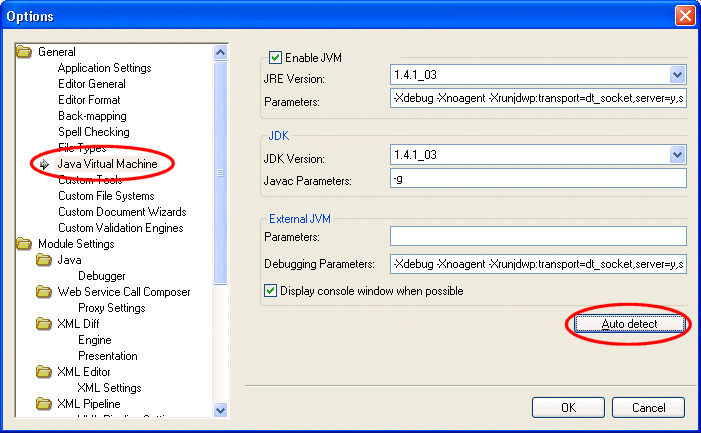
Home >Online Product Documentation >Table of Contents >Modifying Java Component Settings Modifying Java Component SettingsProperties for JVM and JDK components are displayed on the Java Virtual Machine page of the Options dialog box, shown in Figure 99. When you start Stylus Studio, it automatically detects the Java Virtual Machine (JVM) and compiler components installed on your machine and sets the properties for these components accordingly. Once these properties have values, Stylus Studio uses them until you either How Auto Detect Works
The auto detect feature prompts Stylus Studio to fetch the settings from the registry setting
Note that if you manually change your settings to use another local version of the JDK, it may fail to load properly unless you also point the About JVM ParametersAs a rule, you should never change the default values in the Parameter fields for the JVM or the External JVM. This option exists to accommodate unusual configurations. In such situations, Stylus Studio Technical Support might instruct you to change this value. About JDK Parameters
The How to Modify Java Component PropertiesTo modify Java component properties:
1. Start Stylus Studio if it is not already running, and select Tools > Options from the menu.
The Options dialog box appears.
2. Select General > Application Settings > Java Virtual Machine.
3. If you want Stylus Studio to update Java component properties to the latest installed version on you machine, click the Auto detect button.
Otherwise, make the changes manually.
4. Click OK.
5. If you made changes to any JVM properties, you need to restart Stylus Studio for those changes to take effect.
|

XML PRODUCTIVITY THROUGH INNOVATION ™