Cart
Cart
|
Home >Online Product Documentation >Table of Contents >Defining Custom Tools Defining Custom ToolsStylus Studio allows you to define custom tools to run alternative editors, processors, preprocessors, or postprocessors. For example, you can specify a custom tool that configures Internet Explorer to display the document you are working on. After you define a custom tool, Stylus Studio adds an entry to its Tools menu - select Tools and then your tool. The order in which the tool names appear in the Custom Tools options page is the order in which the tool names appear in the Stylus Studio Tools menu. To define a custom tool:
1. From the Stylus Studio menu bar, select Tools>Options.
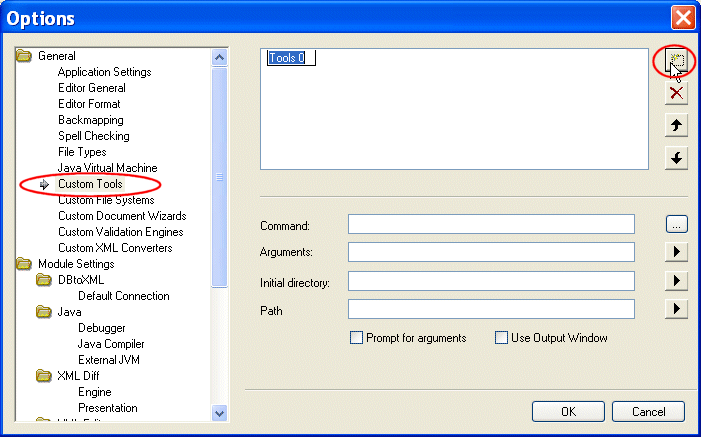
Stylus Studio displays the Options dialog box.
2. Click Custom Tools to display the Custom Tools page.
3. In the Custom Tools page, click Define New Tool  .
.
Stylus Studio displays an entry field for the tool name.
4. Enter the name as you want it to appear in the Stylus Studio Tools menu.
5. In the Command field, specify or select the absolute path for the command that runs your tool. This must be a .exe, .bat, or .cmd file.
6. In the Arguments field, specify any arguments your tool requires. You can click  to display a drop-down list that includes File Path, File Dir, File Name, File Extension, and Classpath.
7. In the Initial Directory field, type the absolute path for the directory that contains any files or directories needed by your custom tool.
8. In the Path field, type any paths that need to be defined and that are not already defined in your PATH environment variable.
9. If you want Stylus Studio to prompt for arguments before it runs your tool, click Prompt for Arguments.
10. If you want Stylus Studio to display output from your custom tool in its Output Window, select Use Output Window.
11. Click the OK button.
|

XML PRODUCTIVITY THROUGH INNOVATION ™