|
Home >Online Product Documentation >Table of Contents >Setting Up Stylus Studio to Debug Sample Files Setting Up Stylus Studio to Debug Sample FilesTo set up Stylus Studio to debug sample files:
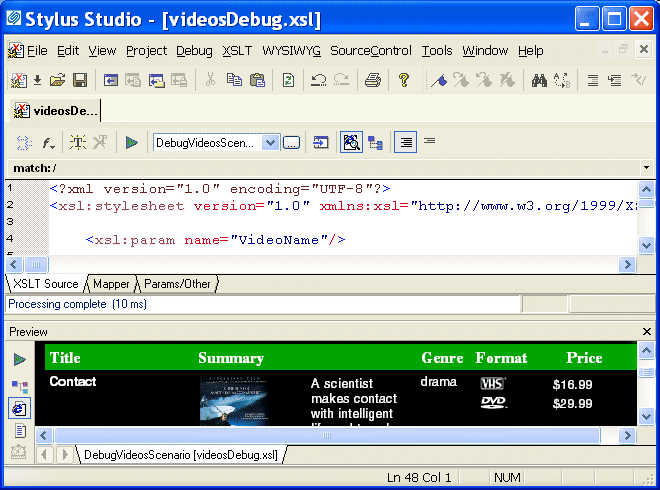
1. Open the videosDebug.xsl stylesheet, located in the examples\VideoCenter directory where Stylus Studio was installed.
Alternative: If the Stylus Studio Project window is open, you can access this stylesheet from the
Stylus Studio displays the
2. In the XSLT editor tool bar, click Preview Result DebugVideosScenario. The source XML document is videos.xml.
Stylus Studio applies the stylesheet and displays the results (a finished HTML page that displays information about a single video) in the Preview window. |

Mail, Package & Freight Delivery
Want to know what mail, package & freight delivery companies are shipping away there XML woes? Now you can! Check out these top mail, package & freight delivery companies that are packaged with the power of Stylus Studio.
XQuery Activist Kit
Help us get the word out! This "XQuery for All" activist's kit will help you get educated about the importance of XQuery and to serve as an important rallying point for the community of Microsoft XML developers who have lost their right to XQuery.
XML File Explorer
The XML File Explorer provides a productive, consistent, and easy-to-use interface for working with any data sources (relational data, EDI, binary, XML, CSV, and more) used in enterprise data integration projects.
Telecommunications Companies That Use Stylus Studio
Can you here me now? When it comes to telecommunications and XML it can get a little fuzzy. That's why these top telecommunication companies turn to Stylus Studio to connect them to their XML needs.