|
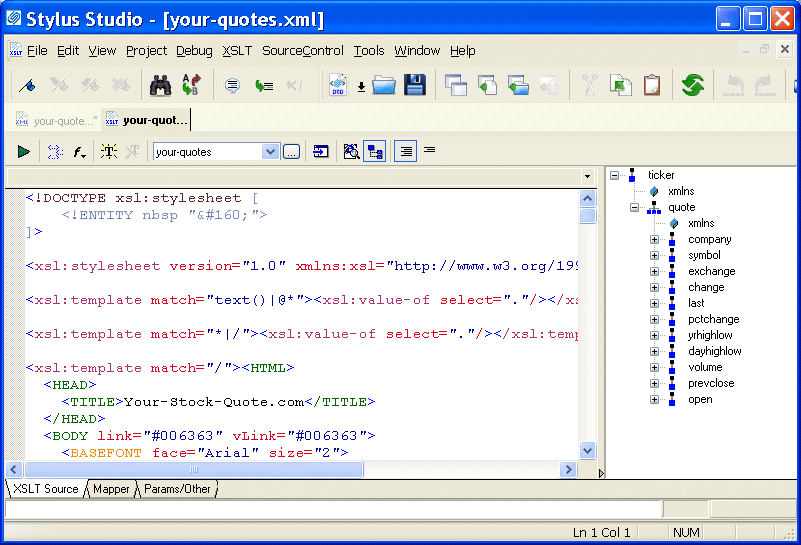
Home >Online Product Documentation >Table of Contents >Opening a Sample Stylesheet Opening a Sample StylesheetTo open the your-quotes.xsl sample XSLT stylesheet in Stylus Studio:
1. In the File Explorer or Open dialog box, navigate to the examples\quotes directory in your Stylus Studio installation directory.
Alternative: If the Stylus Studio
2. Double-click your-quotes.xsl. Stylus Studio displays the your-quotes.xsl document in the XSLT Source tab of the XSLT editor.As with the XML Editor, Stylus Studio uses different colors to distinguish markup, tag names, and data in the XSLT Editor. |

XML Validator
Stylus Studio has a built-in XML validator that supports industry-standard DTD and XML Schema validators including MSXML 4.0 SAX, MSXML 4.0 DOM, Microsoft .NET XML Parser (System.XML), Xerces-J 2.5.1, XSV 2.6, etc. Validate XML with Stylus Studio.
XML Whitepapers
Learn how XML can help you meet your business objectives by reading free XML Whitepapers covering XML, XML Schema, XQuery, SQL/XML, and FIXML technolgies employed in real world case studies.
Using DataDirect XQuery with Stylus Studio
Learn how to query any relational database using XQuery and the XQuery API for Java using DataDirect XQuery, an embeddable Java component, and Stylus Studio the world's leading XML IDE.
Using Relational Data in XML Applications
"Using Relational Data in XML Applications" By Dr. Michael Kay covers an overview of several common use cases and provides insight into the benefits and drawbacks of using the approaches available today including XQuery and SQL/XML.