Cart
Cart
|
Home >Online Product Documentation >Table of Contents >Creating XML Schema from an XML Document Creating XML Schema from an XML DocumentThere are two ways to create XML Schema from an XML document:
Both methods allow you to specify the URI for the generated files (if an XML document has multiple namespaces defined for it, Stylus Studio creates a separate XML Schema associated with each namespace). Using the XML to XML Schema Document WizardUse this procedure when you want to create an XML Schema based on the content of an existing XML document. To use the XML to XML Schema document wizard:
1. Select File > Document Wizards from the menu.
The Document Wizards dialog box appears.
2. Double-click XML to XML Schema.
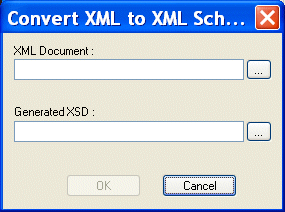
The Convert XML to XML Schema dialog box appears.
3. Specify the XML document you want to use to create an XML Schema in the XML Document field.
4. Specify the URI for the generated file(s) in the Generated XSD field.
5. Click the OK button.
Stylus Studio creates the XML Schema file and opens it in the XML Schema Editor. Using the Create Schema from XML Content FeatureUse this procedure when you want to create an XML Schema based on the content of an existing XML document. To use the Create Schema from XML Content feature:
1. Open the XML document from which you wish to create an XML Schema.
2. Select XML > Create Schema from XML Content from the Stylus Studio menu.
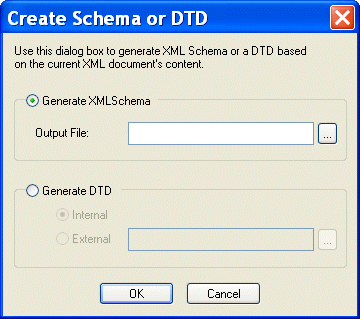
The Create Schema or DTD dialog box appears.
3. Click Generate XML Schema.
The Output File field becomes active.
4. Type a name for the XML Schema you want to create, or use the browse button (  ) to search for an existing file.
5. Click the Yes button.
The XML Schema is created. If you do not specify a complete URL, the schema is written to the same location as the XML document from which it was created. Displaying the New XML SchemaUse this procedure to open the new XML Schema created using the Create Schema from XML Content feature (or to open the XML Schema associated with any active XML document). To display the new XML Schema:
1. Click XML > Open Associated Schema.
2. Select the XML Schema from the drop-down menu.
The XML Schema appears in the XML Schema Editor. |

XML PRODUCTIVITY THROUGH INNOVATION ™