Home >Online Product Documentation >Table of Contents >XS3P Stylesheet Overview
XS3P Stylesheet Overview
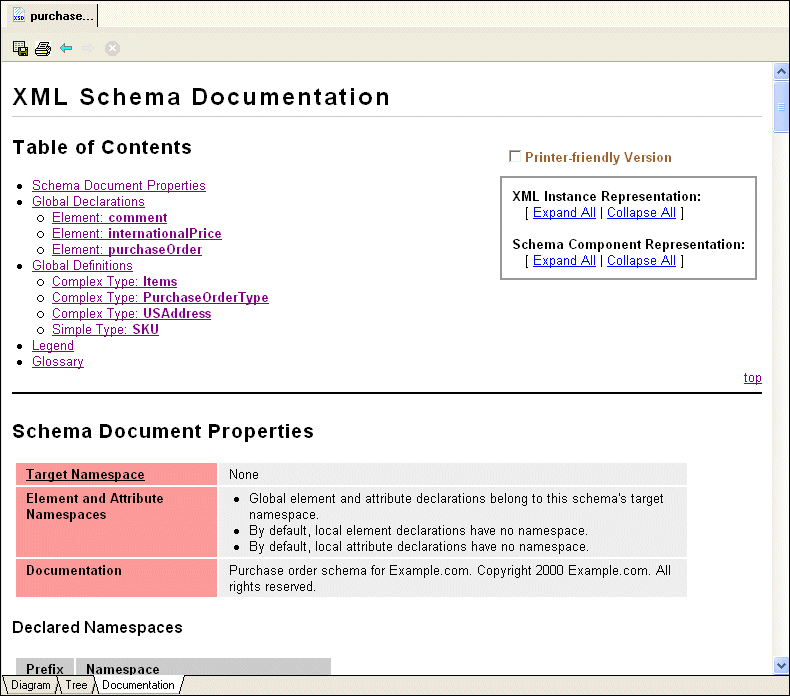
By default, Stylus Studio displays XML Schema on the Documentation tab using the XS3P stylesheet from the DSTC Project Titanium (http://titanium.dstc.edu.au/). Figure 274 shows how the purchaseOrder.xsd looks when displayed using this stylesheet.
|
Figure 274. XML Schema Documentation Displayed Using XS3P Stylesheet
The XS3P stylesheet contains
- A customizable title (the default title is XML Schema Documentation)
- A table of contents with hypertext links to sections in the documentation
- Information about the XML Schema's properties, such as its target namespace and any declared namespaces
- Global declarations and global definitions, if any
- A legend that describes the graphical conventions used in the XML Schema documentation. The legend uses a fictitious type declaration for example purposes.
- A glossary that defines terminology used in the XML Schema documentation.
Tip
|
|
You can hide the legend and the glossary by clicking the Printer-friendly Version check box at the top of the page.
|
This section covers the following topics:
XS3P Stylesheet Features
The XS3P stylesheet has several features that affect content and layout of XML Schema displayed on the Documentation tab. You can
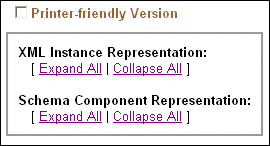
- Create a printer-friendly version of the documentation by clicking the Printer-friendly Version check box.
|
Figure 275. Features of XML Schema Documentation
When you click this check box, Stylus Studio
- Hides the Legend and Glossary sections
- Automatically expands all XML instance and schema component representations
- Removes the expand/collapse controls from the page
- Expand and collapse XML instance and schema component representations. You can do this for every XML instance or schema component by clicking the Expand All and Collapse All buttons associated with these representations. You can also set this option for individual instances by clicking the +/- button, as shown in Figure 276.
|
Figure 276. Representations Can be Collapsed/Expanded Individually
- Customize and modify the XML Schema documentation. For example, you can choose to include all super-types, you can change the default name, and you can specify the sort order. Settings for these and other properties that affect the content and appearance of the XML Schema documentation are displayed in the Options dialog box. See XS3P Stylesheet Settings for more information.
XS3P Stylesheet Settings
The XS3P stylesheet allows you to modify the following:
- Title - The default title is XML Schema Documentation, but you can change it to whatever you want by editing the Title field.
- Sort order - By default, Stylus Studio sorts information in the XML Schema in alphabetical order by type name. If you want to display information in document order, set the Sort by Component field to False.
- Whether or not you want Stylus Studio to search
included and imported XML Schemas. - If you want to incorporate instructions in the HTML, the Use JavaScript option makes it easy for you to add instructions such to display pop-up windows and hide information in the generated HTML document.
- Inclusion in the XML Schema documentation of
- Supertypes
- Subtypes
- Glossary
- Legend
xsd namespace prefix- Schema diagrams
You control these settings on the Documentation page of the Options dialog box.
Modifying the XS3P Stylesheet
You can customize the XS3P stylesheet that Stylus Studio uses to display XML Schema documentation. The XS3P stylesheet is in the \schema-documentation directory where you installed Stylus Studio: bin\Plugins\schema-documentation. The name of the stylesheet file is xs3p.xsl.
Should you choose to modify the default XS3P stylesheet, the new stylesheet must have the same name as the original. After you modify and save this file, click the refresh button on the Stylus Studio tool bar to see your changes.
Tip
|
|
Make a copy of the xs3p.xsl file before you modify it.
|
 Cart
Cart