How to Generate Java Code for XSLT

To generate Java code for XSLT:
1. Define at least one scenario for the XSLT for which you want to generate Java code. The scenario must use the Saxon processor. See <hyperlink>Scenario Settings for more information.
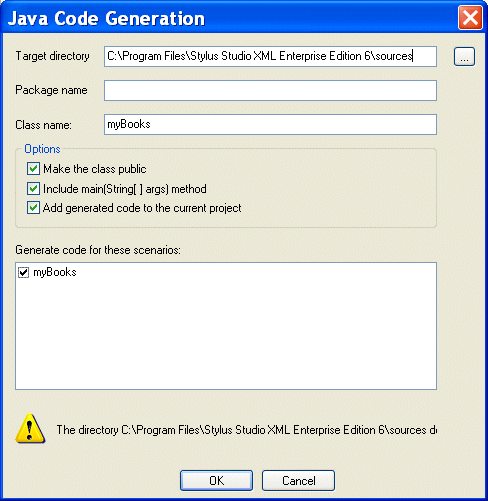
2. Select XSLT > Generate Java Code from the Stylus Studio menu.

The Generate Java Code dialog box appears.

Figure 228. Java Code Generation Dialog Box

3. Specify the settings you want for the target directory, package and class names, and so on. See <hyperlink>Java Code Generation Settings if you need help with this step.
4. Select the scenarios for which you want to generate Java code.
5. Click OK.

Stylus Studio generates Java code for the XSLT. When the code generation is complete, the resulting file (classname .java) is opened in the Stylus Studio Java Editor.

XQuery Editor

Stylus Studio's XQuery development tools are a tremendous help in building and testing XML applications requiring a standards-based approach to querying, integrating and transforming data from various distributed data sources.

HTML Tidy

HTML Tidy is a program for turning HTML into something that can be parsed as XML, unlocking their data for use in XSLT and XQuery programs. Learn how to use HTML Tidy in Stylus Studio now.

Sun Multi-Schema XML Validator (MSV)

Learn how to integrate the Multi Schema Validator (MSV) into Stylus Studio as one of the Custom Validation Engines. It will work for files with a DTD, a single XSD, or both a DTD and a single XSD.

Electronics & Electrical Equipment

Many electronics and electrical equipment companies need the most powerful XML IDE to power up their companies. Come see which electronics & electrical equipment companies are wired up with Stylus Studio 2006.

Stylus Most Wanted

 
Free Stylus Studio XML Training:
W3C Member