Debugging XQuery Documents

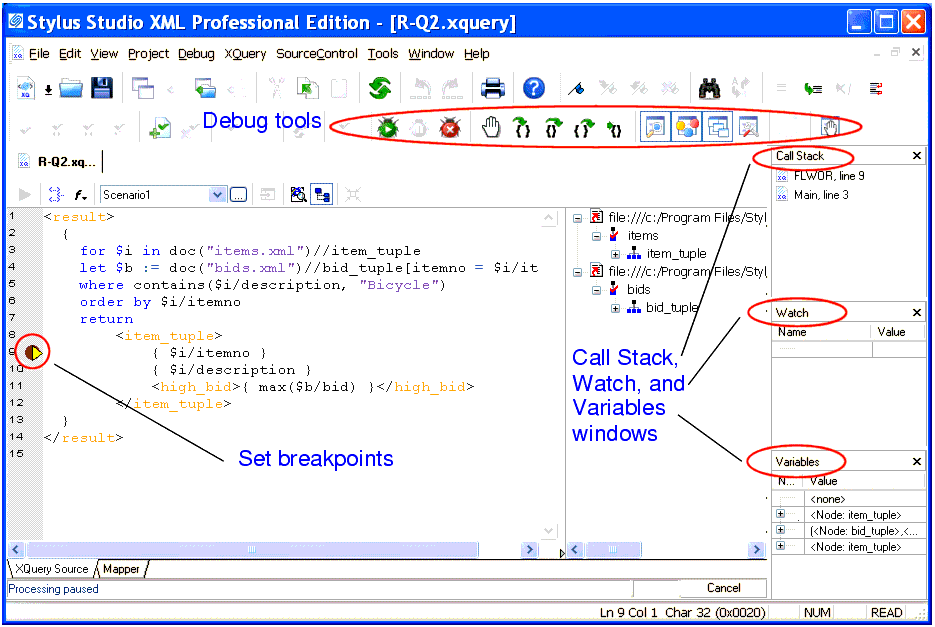
Complex XQuery documents require robust debugging features.

Figure 339. Debugging XQuery in Stylus Studio

With Stylus Studio, you can

  • Set breakpoints in your XQuery documents
  • Monitor the value of XQuery variables.
  • Trace the sequence of XQuery expressions that created output. With a click anywhere in the result, Stylus Studio Visual Backmapping technology displays the XQuery expression responsible for creating that result.
In this section

This section covers the following topics:

Getting EDI to XML and back to EDI Again: Round Trip Engineering using Stylus Studio URL Adapters

A free online video demonstration shows how to use Stylus Studio's Adapter URL technologies to convert EDI to XML and back again. Convert, validate, view and edit EDIFACT data directly in Stylus Studio.

Government Agencies That Use Stylus Studio

Government agencies all around the nation are pledging their allegiance to Stylus Studio. Come see which government agencies are using the only XML IDE by the people and for the people.

Xerces - Parsing and Validating XML with the Apache Xerces Parser

The Xerces Parser supports the XML 1.0 recommendation and W3C's XML Schema recommendation version 1.0, DOM and SAX. Learn how easy it is to use Apache Xerces directly in Stylus Studio to parse and validate XML with ease.

Single Source Publishing

Single source publishing is the ability to use one source of information for generating multiple types of output. Stylus Studio XML Publishing enables Single Source Publishing - publish PDF or HTML documents from Relational, XML or Legacy files.

Stylus Most Wanted

 
Free Stylus Studio XML Training:
W3C Member