Modifying a SOAP Request

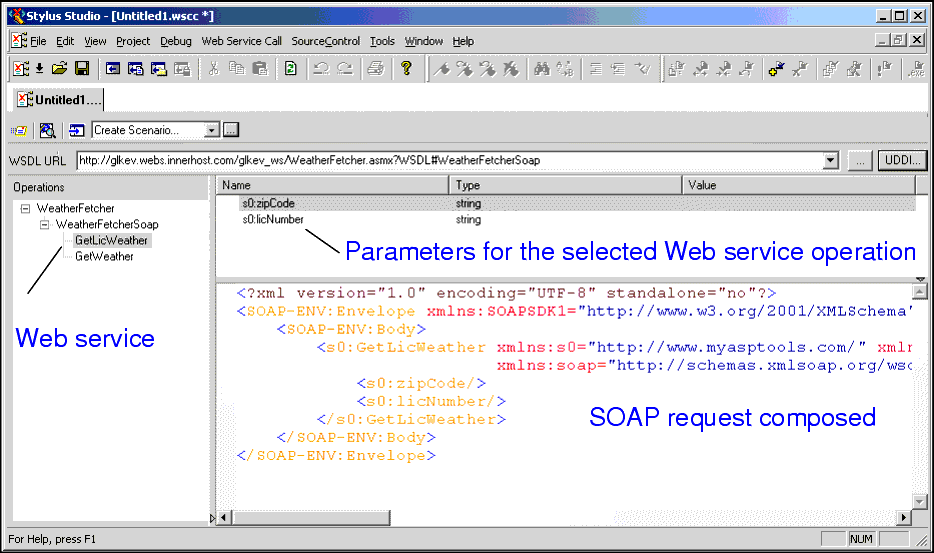
When you select a WSDL from the Result field in the UDDI Browser and click OK, the operations exposed by the Web service are displayed in the Stylus Studio Web Service Call Composer.

Figure 363. Modifying a SOAP request

When you select an operation from the Operations pane, Stylus Studio displays

  • Parameters associated with that operation, including their datatype and a field in which you can enter a value for testing purposes.
  • The XML that describes the SOAP request associated with that operation. You can edit the SOAP request, but for initial testing you should restrict changes to providing parameter values, and you can use the parameter's Value field for this purpose.

HTML to XML Importer

Convert HTML to XML with the Stylus Studio HTML to XML Importer, a powerful, visual utility for Converting HTML to XML with ease.

ADO to XML

The Stylus Studio ADO to XML data coversion wizard simplifies extracting of relational data into any XML format.

XSLT Mapper

Simplify XSLT mapping with the Stylus Studio XSLT Mapper - supports multiple data sources, round-trip engineering (synchronized editing views), XSLT function blocks, integrated XSLT preview and more.

DTD Validator

This page talks about Stylus Studio's DTD Validator it has the ability to specify any third-party XML parsers and validators, real-time syntax checking and DTD validation error reporting, backmapping, integrating third-party DTD validators and more!

Stylus Most Wanted

 
Free Stylus Studio XML Training:
W3C Member