Adding File Types to Stylus Studio

You use the procedure described in this section to associate a file type ( .txt, for example) with a specific Stylus Studio module or editor. Once you do this, any time you open a file of that type from within Stylus Studio (using the File Explorer, for example), that file is opened in the editor you specify.

You can optionally specify that you want to use Stylus Studio as the default editor for files of this type, regardless of where the file is opened (from a file browser like Total Commander, for example).

Note


You do not need to specify the usual extensions, such as xml, xsl, and java. Use the procedure described in this section for file name extensions peculiar to your application or environment.

To add a file type to Stylus Studio:
1. From the Stylus Studio menu bar, select Tools > Options.

Stylus Studio displays the Options dialog box.

2. Under General, click File Types.

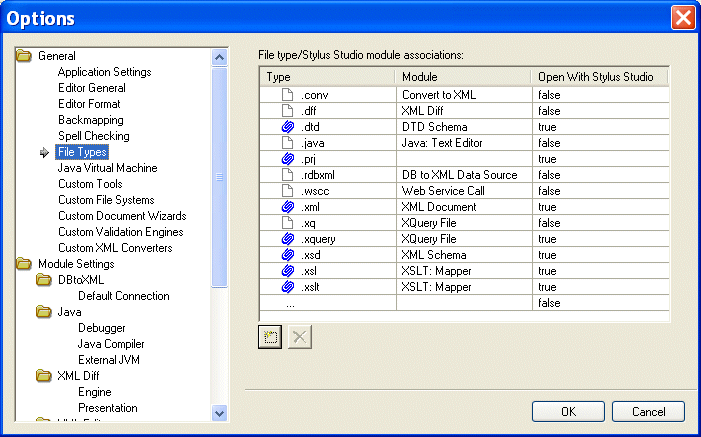
The File Types page appears.

Figure 97. Associating File Types with Stylus Studio Editors

3. To add a new file type/module association, click the Add button.

Alternative: Double-click the Type field.

4. Type the new extension, including the period, and press Enter.

Stylus Studio adds the file type and selects a default module in the Module field.

5. Optionally, select a different module using the drop-down list in the Module field.
6. If you want to always use Stylus Studio to open files of this type, change the value in the Open with Stylus Studio field to True.
7. To add another file type, repeat step 3 through step 6.
8. When you are done, click OK.

Deleting File Types

To delete a file type:
1. Click the file type you want to delete.
2. Click the Delete button.
3. Click OK.

XML Schema Validation

Validate XML using XML Schema with MSXML, XERCES, XSV, SYSTEM.XML, & other XSD Validators. Stylus Studio's XML Schema-Aware XML Editing makes XML Schema Validation a snap!

XPath Editor

Stylus Studio's intelligent code-sensing, auto-completion technology, Sense:X, is XPath-aware. You'll find Sense:X for XPath in all of Stylus Studio's editors, including the XML Editor, XSLT Editor, and XQuery Editor.

Industrial & Farm Equipment

Industrial & farm equipment manufacturers are mowing away the time it takes for data integration with the power of Stylus Studio 2006! See which top industrial and farm equipment manufacturers are cowboying up with Stylus Studio.

DTD Validator

This page talks about Stylus Studio's DTD Validator it has the ability to specify any third-party XML parsers and validators, real-time syntax checking and DTD validation error reporting, backmapping, integrating third-party DTD validators and more!

Stylus Most Wanted

 
Free Stylus Studio XML Training:
W3C Member