|
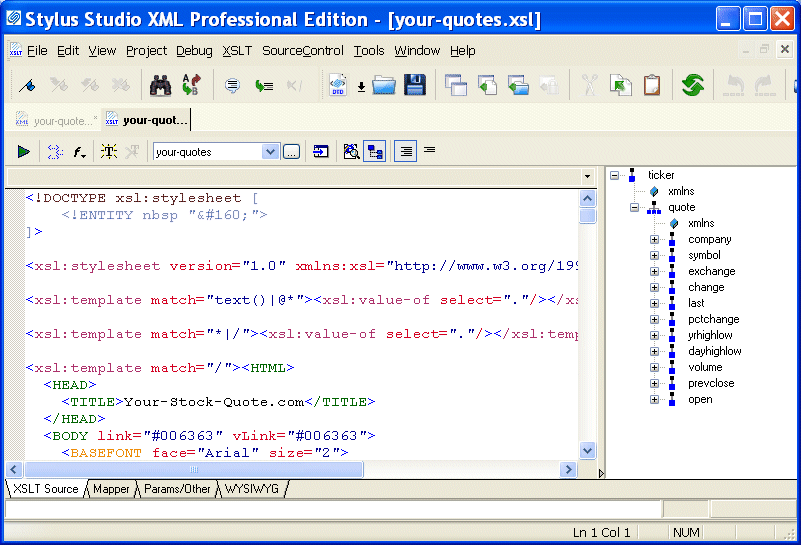
Home > Online Product Documentation > Table of Contents > Opening a Sample Stylesheet Opening a Sample StylesheetTo open the your-quotes.xsl sample XSLT stylesheet in Stylus Studio:
1. In the File Explorer or
Open dialog box, navigate to the
examples\quotes directory in your Stylus Studio installation directory.
Alternative: If the Stylus Studio
2. Double-click
your-quotes.xsl. Stylus Studio displays the
your-quotes.xsl document in the
XSLT Source tab of the XSLT editor.
As with the XML Editor, Stylus Studio uses different colors to distinguish markup, tag names, and data in the XSLT Editor. |

W3C XML Specifications
Learn about the official W3C XML specifications for XML, XSLT, XQuery, XPath, DOM, XML Namespaces, XInclude, XML Base, XPointer, WSDL and more.
Open XSLT Architecture
Learn how Stylus Studio's Open XSLT Architecture enables you to use any of the popular industry-standard XSLT processors (like Saxon, Xalan-J, MSXML, Microsoft .NET, and others) for all your XSLT development tasks.
Energy Companies That Use Stylus Studio
Forget red bull! Many energy companies are using Stylus Studio 2006 for their quick pick me up during the work day. Come see which energy companies are getting the boost they need with Stylus Studio!
Saxon XSLT Processor
Stylus Studio® has partnered with Saxonica, a leading provider of Java-based XSLT and XQuery processing components to offer a robust XSLT 1.0 and 2.0 development environment, featuring development and deployment using the Saxon XSLT processor.