|
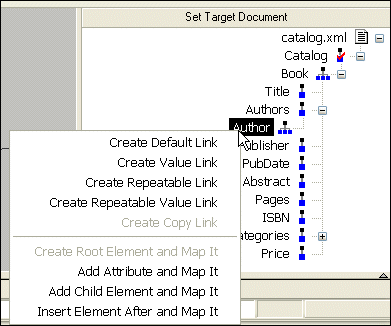
Home > Online Product Documentation > Table of Contents > Left and Right Mouse Buttons Explained Left and Right Mouse Buttons ExplainedYou can use either the left or the right mouse button to perform the drag and drop operation used to create source-target mappings in the XSLT mapper. If you use the left mouse button to perform the drag operation, the link always maps the source node to the target node without making any changes to the target structure. If you use the right mouse button, Stylus Studio displays a shortcut menu that provides you with alternatives for modifying the target structure.
Using this menu, you can
|

Banks That Bank on Stylus Studio for Enhanced XML Productivity
Guess what! You can pass go and collect 200 dollars because with Stylus Studio 2006 you can save your banking company time and labor in every day work activities. Come see which banking companies are already taking advantage of Stylus Studio today!
Validating EDIFACT Documents with XML Schemas
Either before or after transforming EDIFACT content, generated XML Schemas will make sure that we have all of the necessary components, our codes are all according to the standard codelists, and every little delimiter is in the right place.
EAI - Enterprise Application Integration
Using EAI tools included with Stylus Studio it's easy to unlock silos of enterprise data and seamlessly integrate it into your IT applications.
XQuery Documentation Generator
Stylus Studio provides integrated support for xqDoc so you can generate XQuery documentation directly from the XQuery editor.