|
Home > Online Product Documentation > Table of Contents > Obtaining All Marked-Up Text Obtaining All Marked-Up TextWhen you query a document, you do not usually want to obtain all marked-up text. However, an understanding of queries that return all marked-up text makes it easier to define a query that retrieves just what you want.
The following figure shows a complete query (
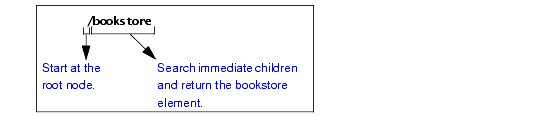
This query returns the
In the query, the initial forward slash (/) instructs the XPath processor to start its search at the root node.
Suppose you run the following query on
This query returns an empty set. It searches the immediate children of the root node for an element named
|

XML Spell Checker
The Stylus Studio Spell Checker is integrated with our intuitive XML Text Editor. It highlights typographical errors as you type and lets you easily search, replace, and build custom dictionaries.
XSLT Profiler
Stylus Studio's XSL and XSLT profiler allows you to create detailed XSLT performance metrics profiles of any stylesheet in a processor-independent way.
XML Syntax Help - Intelligent XML Editing
Stylus Studio's XML Editors feature Intelligent XML Schema/DTD-Aware Code Sensing and context sensitive XML code auto-completion. Simplify XML editing with Stylus Studio today.
Editing XSL Stylesheets
Learn how our powerful XSL stylesheet editor with built-in preview capabilities and synchronized visual and text-based stylesheet editors simplifies XSL and XSLT stylesheet development.