How to Generate JAXB Classes

To generate JAXB classes:
1. Open the XML Schema file for which you want to generate JAXB classes.
2. Click the Diagram tab if it is not already selected.
3. Select XMLSchema > Generate Java from the Stylus Studio menu.

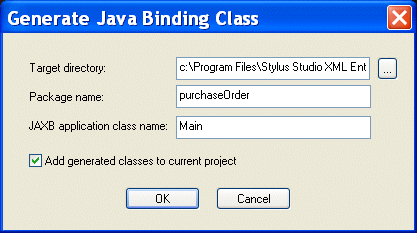
The Generate Java Binding Class dialog box appears.

Figure 302. Generate Java Binding Class Dialog Box

4. If necessary, change the default values.
5. Click OK.

Stylus Studio generates JAXB classes. The Output window displays code generation status.

Open XSLT Architecture

Learn how Stylus Studio's Open XSLT Architecture enables you to use any of the popular industry-standard XSLT processors (like Saxon, Xalan-J, MSXML, Microsoft .NET, and others) for all your XSLT development tasks.

XMLSCHEMA-DEV Blog

XML Schema-DEV is an active community for XML Schema-releated development - join the discussion on XML Schema standards, tools, implementations and more. Bookmark this RSS or ATOM feed today!

Web Service Testing Tools

The Stylus Studio Web Service Tester allows you to easily locate, build references to, and test Web services for XML applications based on WSDL, SOAP, and UDDI standard Web service technologies.

XPath Generator

Stylus Studio includes an XPath generator that helps you easily create XPath expressions. This page illustrates how you can accomplish this.

Stylus Most Wanted

 
Free Stylus Studio XML Training:
W3C Member