XSDdoc Stylesheet Overview

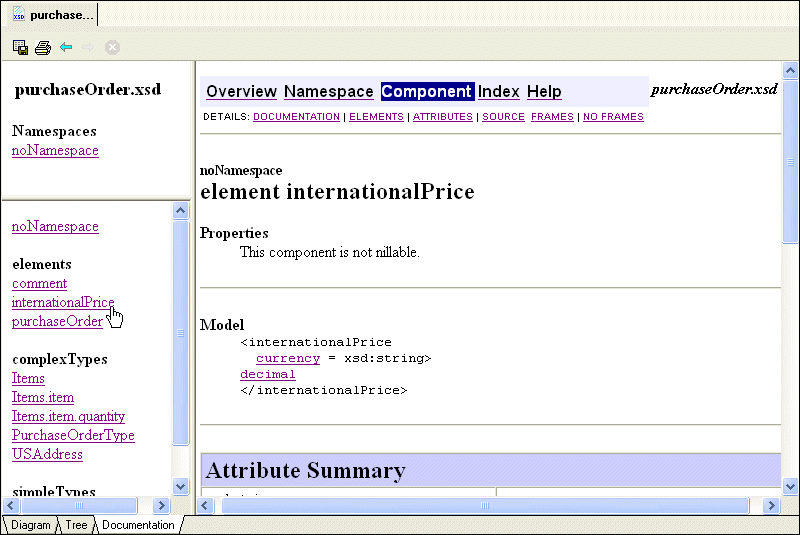
The XSDdoc stylesheet, from xframe ( http://xframe.sourceforge.net/xsddoc.html/) displays XML Schema documentation using a Javadoc look-and-feel. Here is sample of purchaseOrder.xsd displayed using the XSDdoc stylesheet.

Figure 300. XML Schema Documentation Displayed Using XSDdoc Stylesheet

XSDdoc Stylesheet Settings

The XS3P stylesheet allows you to modify the following:

  • Title - The title displayed on the XML Schema documentation's Overview page. The default title is XML Schema Documentation, but you can change it to whatever you want by editing the Doctitle field.
  • Footer - The string that appears at the bottom of every printed page in the XML Schema documentation. The default is http://www.stylusstudio.com.
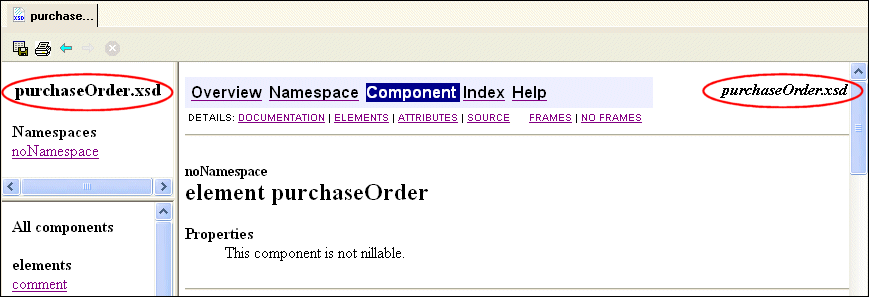
  • Header - The string that appears in the navigation bar, which is displayed at the top and bottom of every page in the XML Schema documentation. Here, the header is purchaseOrder.xsd.

Figure 301. XML Schema Documentation Headers

  • Inclusion in the XML Schema documentation of
    • Attributes
    • Groups
    • Local usage
    • Subtypes
    • Types
    • The name or network address of the proxy host server, and the server port to which Stylus Studio attaches. The proxy host, if needed in your environment, is used to access the Internet in order to resolve imported or included stylesheets.

You control these settings on the Documentation page of the Options dialog box.

XSLT Mapper

Simplify XSLT mapping with the Stylus Studio XSLT Mapper - supports multiple data sources, round-trip engineering (synchronized editing views), XSLT function blocks, integrated XSLT preview and more.

DataDirect XML Converters

DataDirect XML Converters are high-performance Java components which provide bi-directional, programmatic access to virtually any data source as XML.

XML Differencing

Stylus Studio's integrated XML Differencing tool visually computes and analyzes any changes made to files or folders in a highly configurable, XML-aware fashion. Display text or tree views, with changes displayed in a merged view or side-by-side!

Convert HTML to XML

Convert HTML-to-XML with a Document Wizard that quickly converts any HTML to standard XML with the click of a button! To get started, just click File, Document Wizards on the Stylus Studio menu.

Stylus Most Wanted

 
Free Stylus Studio XML Training:
W3C Member