Enabling the Profiler

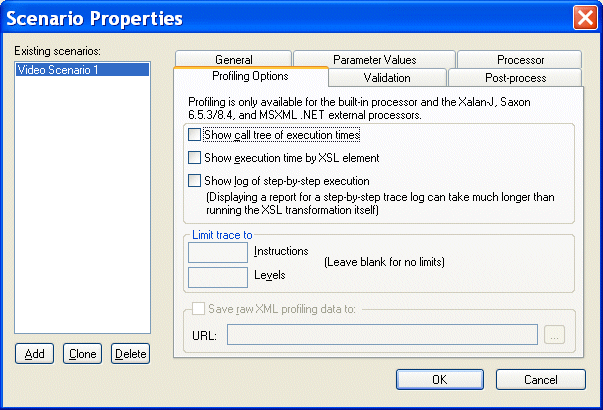
The XQuery Profiler is off by default. You enable the Profiler on the Profiling Options tab of the XSLT Scenario Properties dialog box.

To enable the XSLT Profiler:
1. Open the Scenario Properties dialog box for the XSLT stylesheet. (Click Browse at the top of the XSLT editor window.)
2. Click the Profiling Options tab.

Figure 266. Profiling Options
3. Select the settings for the performance metrics you want the Profiler to capture.
4. Optionally, save the raw Profiler data to a separate file.

Note


This option is available only after you select one or more performance metrics settings.

5. Click OK.

The next time you preview the XSLT results, the performance metrics you selected are available to you in the XSLT Profiler report (and as raw data if you selected that setting and specified a file).

EDI to XML Mapping in Stylus Studio

Learn how to use Stylus Studio's EDI to XML mapping tools in Convert-to-XML, including loading an EDI file, inspecting application control codes, customizing XML output and other advanced EDI to XML mapping features.

XML-to-XML Mapper

XML to XML mapping tools in Stylus Studio provide a powerful visual interface for mapping XML data from-and-to virtually any data format using industry-standard XSLT and XQuery technologies.

Content Management

Build Content Management systems with Stylus Studio's powerful XML publishing tools that enable you to unlock and re-use valuable content from your enterprise information repositories.

OASIS Catalogs for Fun and Profit

This tutorial about, Understanding Catalogs, A Use-Case for Catalogs, Registering Catalogs in a Project, Using the DOCTYPE Syntax Sense:X Aid, Navigating Catalogs, Building Composite Catalogs, Converting TR9401 Catalogs to OASIS XML Catalogs and more

Stylus Most Wanted

 
Free Stylus Studio XML Training:
W3C Member