
|
|||||||||||
| PREV PACKAGE NEXT PACKAGE | FRAMES NO FRAMES | ||||||||||
See:
Description
| Interface Summary | |
| JXTRResultSet | A JXTRResultSet object implements a result set like view for the information returned by executing a jXTransformer query. |
| JXTRResultSetMetaData | Methods to query meta data information for a JXTRResultSet. |
| Class Summary | |
| JXTRBase | JXTRBase is an abstract base class that defines and implements methods shared by all Connect for SQL/XML statement classes. |
| JXTRColInfo | JXTRColInfo implements methods that allow you to work with XML values in a result set returned from a jXTransformer query. |
| JXTRQuery | JXTRQuery implements all processing required to generate an XML document from a jXTransformer query. |
| JXTRQueryBase | JXTRQueryBase is an abstract base class implementing methods
shared by all jXTransformer query classes (JXTRQuery,
JXTRResultSetWrapper). |
| JXTRResultSetWrapper | JXTRResultSetWrapper implements the methods required to execute a SQL query (instead of a SQL/XML query or jXTransformer query) and generate an XML document. |
| JXTRSaxInputSource | JXTRSaxInputSource extends the SAX2 InputSource interface and
typically is used with a JXTRSaxReader object.
|
| JXTRSaxReader | JXTRSaxReader implements a SAX2 XMLReader interface to be used with a JXTRQuery, JXTRResultSetWrapper, or JXTRColInfo object. |
| JXTRSingleTableUpdate | JXTRSingleTableUpdate implements the methods required to execute any row count generating statement (Insert, Update, Delete, and so on) supported by the database and return the count of rows in the database that were updated (update count). |
| JXTRStatement | The JXTRStatement class is used to determine the type of jXTransformer statement (jXTransformer query statement or write statement) and create the corresponding jXTransformer statement object (JXTRQuery or JXTRUpdate). |
| JXTRUpdate | Updates one or multiple database tables using data from an XML input document and a jXTransformer write statement string. |
| JXTRUpdateBase | JXTRUpdateBase is an abstract base class implementing a number of
methods shared between all jXTransformer write classes
(JXTRSingleTableUpdate, JXTRUpdate). |
| Exception Summary | |
| JXTRException | Any unexpected occurrences encountered during the processing of a Connect for SQL/XML class method will cause an JXTRException to be thrown. |
| JXTRSingleTableUpdateException | When the execution of a JXTRSingleTableUpdate object
fails, a JXTRException is thrown. |
| JXTRUpdateException | Any unexpected occurrences during the execution of a a jXTransformer write statement causes a JXTRUpdateException to be thrown. |
| JXTRWarning | Any warnings encountered during the processing of a jXTransformer statement can cause an JXTRWarning to be reported. |
The com.ddtek.jxtr package implements the classes and interfaces required to process and execute jXTransformer queries and write statements.
jXTransformer queries return XML results in the
form of an XML document or a JDBC-like result set. Typically, jXTransformer queries are
executed through the proprietary jXTransformer API,
but they also can be executed through the Connect for SQL/XML JDBC driver.
For an example of a jXTransformer query, see jXTransformer Query Example.
For more information about
the jXTransformer implementation, jXTransformer query syntax, and instructions on how to
create jXTransformer queries, refer to the Connect for
http://www.datadirect-technologies.com/download/docs/dochome.asp.
The following figure shows the
components involved when a jXTransformer query is used
in a Java application.
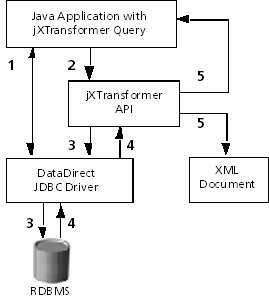
1.
The
Java application establishes a JDBC connection with the
database.
2.
The
Java application issues the jXTransformer query using
the jXTransformer API.
3.
The
jXTransformer API processes the jXTransformer query and sends one or multiple SQL99
statements through the DataDirect Technologies JDBC driver to the database to
retrieve the result set.
4.
The
DataDirect Technologies JDBC driver returns the requested result set to the
jXTransformer API.
5.
The
jXTransformer API formats the data in the XML
structure specified by the jXTransformer query and
returns it to the application (for example, in a DOM or JDOM representation) or
writes it to a standalone XML document file.
jXTransformer queries contain two types of
instructions for the jXTransformer API to process. The
first type of instruction is conventional SQL99, which is used to identify the
data that will be retrieved. The second type includes XML constructors that are
used to create the XML structures of the data the query will return.
For example, let us
examine a simple SQL query:
SELECT
   e.EmpID,
   e.FirstName,
   e.LastName,
   e.Title,
   e.StartDate,
   e.HourlyRate
FROM Employees e WHERE e.StartDate >= {d '2000-01-01'}
Now, let us compare the preceding SQL99 query with a jXTransformer query that uses the same Select statement and adds jXTransformer syntax constructs about how to structure the data that the query retrieves in XML:
xml_document(xml_element('result',
 SELECT
    xml_element('Employees_Info',
       xml_attribute('ID', e.EmpID),
       xml_element('name',
           xml_element('first', e.FirstName),
           xml_element('last', e.LastName) ),
        xml_element('title', e.Title),
        xml_element('hiredate', e.StartDate),
        xml_element('salary', e.HourlyRate) )
 FROM Employees e WHERE e.StartDate >= {d '2000-01-01'} ))
The resulting XML document for this
jXTransformer query example would look like
this:
<?xml version="1.0" encoding="UTF-8" ?>
<result>
   <Employees_Info ID='9'>
      <name>
         <first>Mike</first>
         <last>Johnson</last>
      </name>
      <title>Mr</title>
      <hiredate>2000-01-15 00:00:00.)</hiredate>
      <salary>95</salary>
   </Employees_Info>
   <Employees_Info ID='18'>
      <name>
         <first>Sonia</first>
         <last>Evans</last>
      </name>
      <title>Ms</title>
      <hiredate>2000-10-0 00:00:00.0</hiredate>
       <salary>105</salary>
   </Employees_Info>
</result>
To write data stored in XML
documents to relational databases, you create jXTransformer write statements (Insert, Update, and Delete
statements). jXTransformer
write statements allow you to perform the following tasks:
·
jXTransformer Insert statements insert data from
an XML document into new rows in relational database
tables.
·
jXTransformer Update statements update data in
relational database tables with data from an XML document.
·
jXTransformer Delete statements delete data in a
relational database table. The rows that are deleted are specified by a Where
clause in the jXTransformer Delete
statement.
For an example of a jXTransformer write statement, see jXTransformer Write Statement
Example.
For more information about the jXTransformer write statement implementation, jXTransformer write statement syntax, and instructions on
how to create jXTransformer write statements, refer to
the Connect for
http://www.datadirect-technologies.com/download/docs/dochome.asp.
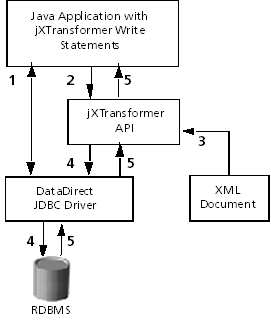
1.
The
Java application establishes a JDBC connection with the
database.
2.
The
Java application issues the jXTransformer write
statement (Insert, Update, or Delete) using the jXTransformer API.
3.
The
jXTransformer API retrieves the data that is to be
written to the database from the XML document.
4.
The
jXTransformer API sends one or multiple SQL99
statements through the DataDirect Technologies JDBC driver to the database and
the database tables are updated.
5.
The
DataDirect Technologies JDBC driver returns the result of executing the jXTransformer write statements to the jXTransformer API, and the API returns update row count
values to the application.
The following example inserts new
rows into the following database tables:
The values for the columns are
retrieved from the following XML document named emp.xml:
<?xml version="1.0" encoding="UTF-8"?>
<insert>
  <employee ID="21" FirstName="Anne" LastName="Dodsworth"
    Title="Miss" StartDate="2001-10-24" HourlyRate="115">
    <resume><![CDATA[
      <a href='http://www.xesdemo/resume/21.htm'>
       A. Dodsworth</a>]]></resume>
    <benefits>
      <benefit ID="1" Amount="1"
      <benefit ID="2" Amount="175" StartDate="2001-11-01"/>
    </benefits>
    <projects>
      <project ID="8">
        <task>Analysis</task>
        <task>Development</task>
      </project>
      <project ID="9">
        <task>Analysis</task>
      </project>
    </projects>
  </employee>
</insert>
Insert
statement:
insert xml_document('emp.xml', 1)
  into Employees (EmpId, FirstName, LastName, Title,
    StartDate, HourlyRate, Resume)
    xml_row_pattern('/insert/employee')
    values( xml_xpath('@ID', 0, 'Integer'),
            xml_xpath('@First'),
            xml_xpath('@LastName'),
            xml_xpath('@Title'),
            xml_xpath('@StartDate', 'Timestamp'),
            xml_xpath('@HourlyRate', 'Integer'),
            xml_xpath('resume[1]/text()')
          )
  into EmpBenefits (BenefitId, EmpId, Amount, StartDate)
    xml_row_pattern('/insert/employee/benefits/benefit')
    values( xml_xpath('@ID', 'Integer'),
            xml_xpath('../../@ID', 'Integer'),
            xml_xpath('@Amount', 'Integer'),
            xml_xpath('@StartDate', 'Timestamp')
          )
  into Assignments (ProjId, EmpId, Task)
    xml_row_pattern('/insert/employee/projects/project/task')
    values( xml_xpath('../@ID', 'Integer'),
            xml_xpath('../../../@ID', 'Integer'),
            xml_path('text()')
          )
Results:
One new row inserted into the
Employees table:
|
EmpId |
LastName |
FirstName |
Title |
StartDate |
EndDate |
HourlyRate |
Resume |
|
21 |
Dodsworth |
Anne |
Miss |
2001-10-24 |
|
115 |
<a href='http://www.xesdemo/resume21.htm'> |
Two new rows inserted into the EmpBenefits table:
|
EmpId |
BenefitId |
StartDate |
EndDate |
Amount |
|
21 |
1 |
2001-10-24 |
|
1 |
|
21 |
2 |
2001-22-01 |
|
175 |
Three new rows inserted into the
Assignments table:
|
EmpId |
ProjId |
Task |
StartDate |
EndDate |
TimeUsed |
EstimatedDuration |
|
21 |
8 |
Analysis |
|
|
|
|
|
21 |
8 |
Development |
|
|
|
|
|
21 |
9 |
Analysis |
|
|
|
|
The DataDirect Query Builder
for
For instructions on creating queries
with the Builder, refer to the Connect for
http://www.datadirect-technologies.com/download/docs/dochome.asp.
The following figure shows the most
important jXTransformer API
classes:
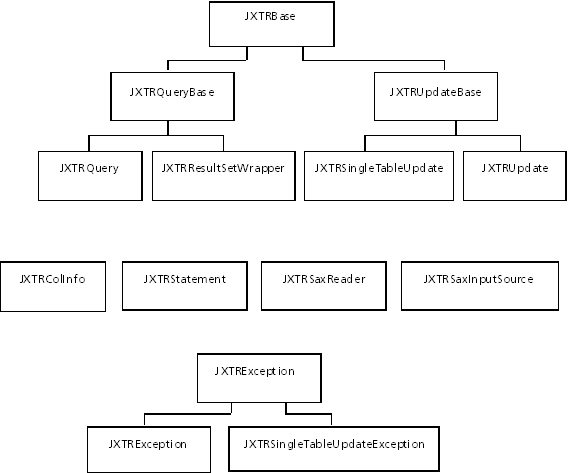
See the following sections for a
brief description of each class shown in the preceding diagram.
In addition, a description of the
JXTRResultSet and JXTRResultSetMetaData interfaces
follows.
The JXTRQuery class implements methods to execute a jXTransformer query and retrieve the XML result in one of
the supported representations (DOM, JDOM, and so on). This class also provides
methods that can be used to:
The JXTRResultSetWrapper class implements methods that allow you
to generate XML documents from SQL99 queries. In this case, the rows and columns
returned from the SQL queries are transformed into either a flat-attribute or
element-centric structure.
The JXTRUpdate class implements methods to execute a jXTransformer write statement (Insert, Update, and
Delete). The JXTRUpdate class provides the
following methods:
The JXTRSingleTableUpdate class is used to execute any row count
generating SQL99 statement based on one or multiple sets of parameter marker
values that are retrieved from an input XML document. The JXTRSingleTableUpdate class implements the following
methods:
The following classes allow you to
modify an existing SAX2 application to accept its input from a jXTransformer query:
When a jXTransformer API method detects a problem, a JXTRException is thrown. Depending on the type of problem,
the JXTRException object contains an optional nested
exception.
When a jXTransformer write statement detects an error, a JXTRUpdateException (or JXTRSingleTableUpdateException) is thrown. In addition to
the inherited methods from JXTRException, a method is
provided to retrieve the update count array.
The JXTRStatement class can be used to determine the type of
jXTransformer statement (query or write statement)
based on the statement text.
JXTRStatement exposes the following
methods:
The JXTRColInfo class exposes methods that allow you to retrieve
the associated XML in different representations when using JXTRResultSet (for
example, JXTRQuery.executeQuery). The following XML
representations are supported:
The JXTRResultSet interface allows you to return XML values in
result sets from a jXTransformer query. This class "mimics" the JDBC result set interface,
but is not equivalent to it and exposes methods
to
JXTRResultSetMetaData provides typical JDBC meta data information.
|
|||||||||||
| PREV PACKAGE NEXT PACKAGE | FRAMES NO FRAMES | ||||||||||