The com.ddtek.jdbc.jxtr package implements the JDBC 3.0
interfaces for the Connect for
SQL/XML JDBC driver,
which is used to process the result set returned from a
SQL/XML query and create a
SQL/XML data source.
Using
SQL/XML Queries
SQL/XML queries return JDBC result sets
that can contain XML values. SQL/XML queries must be executed through
the Connect for SQL/XML JDBC driver.
SQL/XML is an extension to the ANSI/ISO
SQL standard.
For an example of an SQL/XML
query, see SQL/XML
Query Example.
See more
information:
For more
information about the SQL/XML implementation, SQL/XML query syntax, and instructions on
how to create SQL/XML queries, refer to the
Connect for SQL/XML User's Guide, which can be located in your Connect
for SQL/XML installation and on the DataDirect
Documentation Web page at:
http://www.datadirect-technologies.com/download/docs/dochome.asp
Using
SQL/XML Queries in Java Applications
The following figure shows the
components involved when a SQL/XML query is used in a Java
application
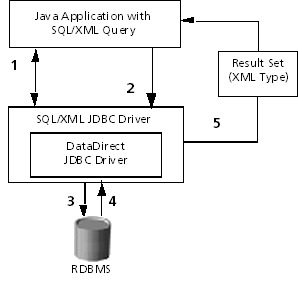
1.
The Java application
establishes a JDBC connection with the database.
2.
The Java application
issues the SQL/XML query using the
Connect for
SQL/XML JDBC driver.
3.
The Connect for
SQL/XML JDBC driver
processes the SQL/XML query and sends one
or multiple SQL statements through to the database to retrieve the
result set.
NOTE: As database
vendors begin implementing the SQL/XML extensions to SQL,
the Connect for
SQL/XML JDBC driver may not need to process the SQL/XML query before sending
it to the database. Whether the driver processes the
SQL/XML query in the future
will depend on performance advantages.
4.
The database sends
the requested result set to the Connect for
SQL/XML JDBC driver.
5.
The Connect for
SQL/XML JDBC driver creates
a JDBC result set containing the XML structure specified by the
SQL/XML query and returns it
to the application.
SQL/XML queries contain two types of
instructions for the Connect for SQL/XML JDBC driver to process. The first
type of instruction is conventional SQL99, which is used to identify the data
that will be retrieved. The second type includes XML constructors that are used
to create the XML structures of the data the query will
return.
For
example, let us examine a simple SQL query:
SELECT
   e.EmpID
  e.FirstName
  e.LastName
  e.Title
  e.StartDate
  e.HourlyRate
FROM Employees e WHERE e.Start-Date >= {d '2000-01-01'}
Now, let us compare
the preceding SQL query with a SQL/XML query that uses the
same Select statement and wraps XML constructors around the columns to define
how to structure the JDBC result set:
SELECT
  XMLELEMENT (NAME "EMPLOYEES_INFO",
     XMLATTRIBUTES (e.EmpID AS "ID"),
    XMLELEMENT (NAME "name",
      XMLELEMENT (NAME "first", e.FirstName),
       XMLELEMENT (NAME "last", e.LastName)),
    XMLELEMENT (NAME "title", e.Title),
    XMLELEMENT (NAME "hiredate", e.StartDate),
    XMLELEMENT (NAME "salary", e.HourlyRate)) AS "result"
FROM Employees e WHERE e.StartDate >= {d '2000-01-01'}
Notice that, in this
example, we used every column specified in the SQL query and wrapped XML
constructors around the columns. The returned result set contains one column and
two rows.
|
result |
<Employees_Info ID='9'>
      <name>
         <first>Mike</first>
         <last>Johnson</last>
      </name>
      <title>Mr</title>
      <hiredate>2000-01-15 00:00:00.0</hiredate>
      <salary>95</salary>
</Employees_Info> |
<Employees_Info ID='18'>
     <name>
        <first>Sonia</first>
        <last>Evans</last>
      </name>
      <title>Ms</title>
      <hiredate>2000-10-01 00:00:00:.0</hiredate>
      <salary>105</salary>
</Employees_Info>
|
To represent XML in result sets,
SQL/XML introduces a data type called the
XMLType and places instances of the XML type in
columns. Connect for
SQL/XML provides the com.ddtek.jdbc.jxtr.XMLType class to allow instances of the
XMLType to be retrieved as DOM, JDOM, SAX, or
text.
DataDirect Query Builder
for
SQL/XML
The DataDirect Query Builder
for
SQL/XML is a graphical user interface tool
that helps you create and modify Connect for SQL/XML queries, both
SQL/XML and jXTransformer queries. It also allows you to test jXTransformer write statements. You also can use the
DataDirect Query Builder to check the syntax of queries and write statements
before you use them in your Java applications. You can save a query as a Builder
project file for future fine-tuning or reuse.
For instructions on creating queries
with the Builder, refer to the Connect for SQL/XML User's Guide, which can be found in your Connect
for SQL/XML installation and on the
DataDirect Documentation Web page at:
http://www.datadirect-technologies.com/download/docs/dochome.asp.
Connect
for
SQL/XML JDBC Driver
The Connect for SQL/XML JDBC driver translates
SQL/XML statements into database-specific
statements that do not contain any XML operators. The driver uses either a
DataDirect Connect for JDBC driver or the DataDirect SequeLink JDBC driver to communicate with the
database.
Because the result of a
SQL/XML operator is an XML-typed column
and because the current JDBC specification does not support an XML data type,
the Connect
for SQL/XML JDBC driver introduces a new type
and associated Java class to represent and access XML-typed columns. This Java
class is com.ddtek.jdbc.jxtr.XMLType.
For more information:
For more details about connecting with the Connect for
SQL/XML JDBC driver, refer to the Connect for SQL/XML User's Guide.
Driver and Data Source
Classes
The driver class for the Connect for
SQL/XML JDBC driver
is:
com.ddtek.jdbc.jxtr.JXTRDriver
The data source class for the
Connect for
SQL/XML JDBC driver is:
com.ddtek.jdbc.jxtr.JXTRDataSource
Data
Source
Because a Connect for
SQL/XML JDBC driver data source embeds a
Connect for JDBC data source or a SequeLink
for JDBC
data source, constructing a SQL/XML data source (com.ddtek.jdbc.jxtr.JXTRDataSource) requires you to pass a
pre-constructed data source to the SQL/XML data source constructor.
Your Connect for SQL/XML
installation contains examples that show how to create and use Connect
for SQL/XML data sources.
Connection URL
The
syntax of URLs for the Connect for
SQL/XML
JDBC driver is:
jdbc:datadirect:jxtr:db://hostname:port[;conn_properties]
where:
db is one of the following
values: db2, informix, oracle, sqlserver, sybase, or sequelink. The values db2, informix, oracle, sqlserver, and sybase indicate that the Connect
for SQL/XML JDBC driver uses
an underlying Connect for JDBC
driver for a database connection. The value sequelink
indicates that the Connect for
SQL/XML
JDBC driver uses the SequeLink JDBC driver for a
database connection.
hostname is the TCP/IP address or TCP/IP host
name of the server to which you are connecting.
port is the number of the
TCP/IP port.
conn_properties is a semicolon-separated list of
connection properties for the Connect for SQL/XML JDBC driver and the DataDirect
Technologies JDBC driver you are using for the connection to the database. Refer to the Connect
for JDBC or SequeLink documentation for information
about connection properties supported by each DataDirect Technologies JDBC
driver.
For example:
jdbc:datadirect:jxtr:db2://server1:50000;DatabaseName=SAMPLE;PackageName=JDBCPKG;binaryEncoding=hex
or
jdbc:datadirect:jxtr:sequelink://189.23.5.132:19996;databaseName=stores7;timeStampEncoding=iso8601
Connection Properties
The Connect for SQL/XML JDBC driver embeds either one
Connect for JDBC driver or the SequeLink JDBC driver. All connection properties supported
by these drivers also are supported by the Connect for SQL/XML JDBC driver. Refer to the Connect
for JDBC or SequeLink documentation for information about supported
connection properties.
NOTE: All connection
property names are case-sensitive. For example, binaryencoding is different than binaryEncoding.
The following connection properties
are specific to the Connect for SQL/XML JDBC driver.
·
binaryEncoding - specifies the type of
binary-to-string conversion to use when retrieving binary information from the
database. Valid values
are either base64 or
hex. The default value is base64.
·
nullReplacementValue - sets the value to replace NULL
values that are retrieved from the database (for example, nullReplacementValue=no value available). If no value is
specified, NULL values are not replaced by another value.
·
timestampEncoding - specifies the type of
timestamp-to-string conversion to be used when representing timestamp values in
an XML document. Valid values are either odbc or
iso8601. The default value is odbc, which uses the
standard ODBC encoding as specified in the ODBC specification. Timestamps are
converted to a string with the following format mask: YYYY-MM-DD HH:MI:SS[.ffffff]. The value iso8601
uses an ISO standard for the timestamp-to-string conversion. The format mask
used is YYYY-MM-DDTHH:MI:SS[.ffffff].
Hints
Connect for SQL/XML supports some hints (options or
optimizations) that are not supported by the JDBC API. Hints are set by adding
comments to your SQL/XML query.
The following hints are
supported
·
binary_encoding –
specifies the type of binary-to-string conversion to be used when retrieving
binary information from the database. Valid values are base64 and hex. The
default value is base64.
·
key_expr – specifies a
select expression that uniquely identifies each of the rows retrieved from the
database. Multi-part keys are supported by specifying more than one key_expr value pair in the hint (for example, key_expr=c.CustId; key_expr=c.Name). Because a
SQL/XML query can contain nested queries, you can
specify multiple sets of keys by prefixing each of the queries with a set of
key_expr hints.
·
null_replacement – sets
the value to replace NULL values that are retrieved from the database. If no
value is specified, NULL values are not replaced by another value.
·
rewrite_algorithm –
specifies the way in which the Connect for
SQL/XML JDBC driver translates
the SQL/XML query into one or more statements
that the underlying database supports. Valid values are nested_loop and sorted_outer_union. The default value is sorted_outer_union.
·
timestamp_encoding –
specifies the type of timestamp-to-string conversion to be used when retrieving
timestamp information from the database. Valid values are iso8601 and odbc. The default value is odbc.
Examples:
/*{jxtr-hints timestamp_encoding=iso8601;null_replacement=not applicable; */
SELECT
XMLELEMENT(name empinfo,
   XMLATTRIBUTES(e.EmpId as "id",
   e.FirstName as "first",
   e.LastName as "last",
   e.StartDate as "start",
   e.EndDate as "end"))
FROM Employees e
Classes and Interfaces Used by the Connect
for SQL/XML JDBC Driver
The com.ddtek.jdbc.jxtr package contains:
·
XMLType and JXTRDataSource classes
·
JXTRStatementFactory
interface
XMLType
For SQL/XML queries that return XML data in the
result set, your Java application must use the getObject method on the XML data and cast the retrieved
object to com.ddtek.jdbc.jxtr.XMLType.
The XMLType class supports the following methods to instantiate
the actual XML document or document fragment:
·
generateSAX
·
getClob
·
getDom
·
getJDOM
·
getString
·
writeXML
All
these methods, except generateSAX and writeXML, require the complete instantiation of the XML
document or document fragment on the client side. Depending on the size of the
generated XML, this can cause memory usage or performance
issues.
JXTRDataSource
Because the
SQL/XML data source embeds
either a Connect
for
JDBC data source or a
SequeLink
for
JDBC data source,
constructing a SQL/XML data source requires
you to pass a pre-constructed data source to the SQL/XML data source
constructor. You use the methods in the JXTRDataSource
class to accomplish this task. You also can set any of the connection properties
defined in Connection
Properties.
JXTRStatementFactory
The methods of this
interface let you process jXTransformer statements
when you are using a Connect
for SQL/XML JDBC driver
connection in a Java application.
Related
Information
