
Table of contentsAppendices |
5.2 Simple Links (Simple Links (simple-Type Element)A simple link is a link that associates exactly two Resource, one Local resource and one Remote resource, with an arc going from the former to the latter. Thus, a simple link is always an outbound link. The purpose of a simple link is to be a convenient shorthand for the equivalent extended link. A single simple linking element combines the basic functions of an extended-type element, a locator-type element, an arc-type element, and a resource-type element. The following diagram shows the characteristics of a simple link; it associates one local and one remote resource, and implicitly provides a single traversal arc from the local resource to the remote one. This could represent, for example, the name of a student appearing in text which, when clicked, leads to information about the student. 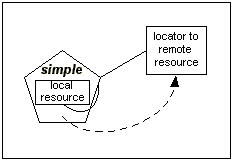 Simple Link Functionality Done with an Extended Link
A simple link could be represented by an extended link in approximately the following way: <studentlink xlink:type="extended">
<resource
xlink:type="resource"
xlink:label="local">Pat Jones</resource>
<locator
xlink:type="locator"
xlink:href="..."
xlink:label="remote"
xlink:role="..."
xlink:title="..." />
<go
xlink:type="arc"
xlink:from="local"
xlink:to="remote"
xlink:arcrole="..."
xlink:show="..."
xlink:actuate="..." />
</studentlink>
A simple link combines all the features above (except for the types and labels) into a single element. In cases where only this subset of features is required, the XLink simple linking element is available as an alternative to the extended linking element. The features missing from simple links are as follows:
The XLink element for simple links is any element with an attribute in the XLink namespace called type with a value of simple. The simple equivalent of the above extended link would be as follows: <studentlink xlink:href="...">Pat Jones</studentlink> The simple-type element Must, May, etc. have any content. The simple-type element itself, together with all of its content, is the local resource of the link, as if the element were a resource-type element. If a simple-type element contains nested XLink elements, such contained elements have no XLink-specified relationship to the parent link. It is possible for a simple-type element to have no content; in cases where the link is expected to be traversed on request, interactive XLink applications will typically generate some content in order to give the user a way to initiate the traversal. The simple-type element effectively takes the locator attribute href and the semantic attributes role and title from the locator-type element, and the behavior attributes show and actuate and the single semantic attribute arcrole from the arc-type element. It is not an error for a simple-type element to have no locator (href) attribute value. If a value is not provided, the link is simply untraversable. Such a link may still be useful, for example, to associate properties with the resource by means of XLink attributes. Sample simple-Type Element Declarations and InstanceFollowing is a non-normative set of declarations for a simple-type element. <!ELEMENT studentlink ANY>
<!ATTLIST studentlink
xlink:type (simple) #FIXED "simple"
xlink:href CDATA #IMPLIED
xlink:role NMTOKEN #FIXED "http://www.example.com/linkprops/student"
xlink:arcrole CDATA #IMPLIED
xlink:title CDATA #IMPLIED
xlink:show (new
|replace
|embed
|other
|none) #IMPLIED
xlink:actuate (onLoad
|onRequest
|other
|none) #IMPLIED>
Following is how an XML document might use these declarations. ..., and <studentlink xlink:href="students/patjones62.xml">Pat Jones</studentlink> is popular around the student union. |