Home >
Online Product Documentation >
Table of Contents >
How to Use This Help System
How to Use This Help System
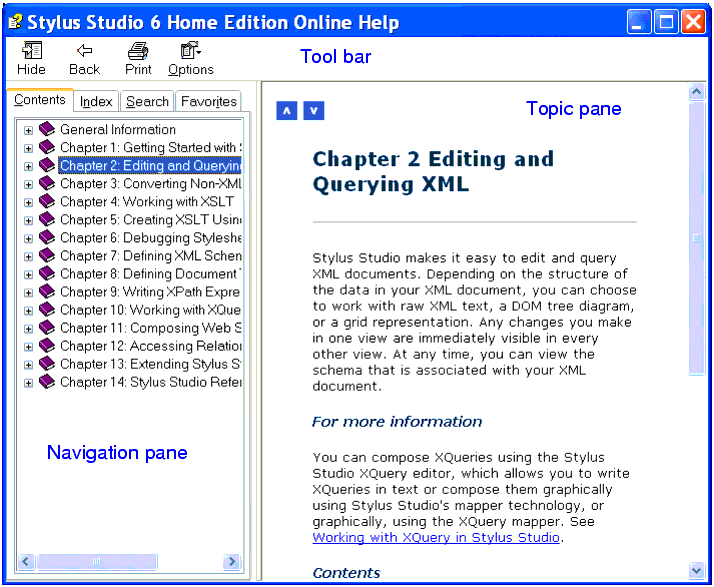
The HTML Help Viewer contains three areas.
|
|
Figure 1. HTML Help Viewer
The Topic pane displays the Help topics.
Click the Previous
 and Next
 icons, which are located at the top and bottom of this pane, to navigate to the topics that immediately precede and follow the topic that you are viewing.
The Navigation pane displays four tabs:
-
Contents - Click the plus (+) or minus (-) sign to the left of the topic titles to expand or contract the table of contents.
-
Index - Type the word or phrase you want to find into the box at the top, or use the scroll bar to the right to scroll up and down.
-
Search - Use advanced full-text search to search the Help system using Boolean, wildcard, and nested expressions. See
Search Tips for more information.
-
Favorites - Create a list of your favorite Help topics. To add a topic to the Favorites tab, navigate to the topic you want and click
Add.
The Tool bar provides the following buttons:
-
Hide/Show - Opens or closes the Navigation pane.
-
Locate - Opens the Contents tab, and highlights the current topic to indicate where it is located.
-
Back - Takes you to the previously viewed topic.
-
Forward - Returns you to the topic you were viewing before you clicked Back.
-
Print - If you are in the
Contents tab, provides options to print the selected topic or the selected heading and all its subtopics. If you are in the
Index or
Search tab, it opens the
Print dialog box to print the current topic.
-
Options - Opens a menu that contains all of the commands found on the Toolbar, providing accessibility shortcut keys for each. The following commands are also provided:
-
Home - Jumps you to the Help system's home page.
-
Stop - Stops downloading file information. Use this feature when the Help system contains a link to the Web; you can choose this option to stop a Web page from downloading.
-
Refresh - Updates the current topic in the Topic pane. Use this feature when the Help system contains a link to the Web.
-
Internet Options - Opens the Microsoft Internet Explorer
Internet Options dialog box.
-
Search Highlight Off/On - Turns highlighting of search terms off or on.
 Cart
Cart