|
Home > Online Product Documentation > Table of Contents > Referencing XML Schemas in the Diagram View Referencing XML Schemas in the Diagram ViewTo reference an XML Schema in the Diagram view:
1. Right-click the
schema node
2. Click
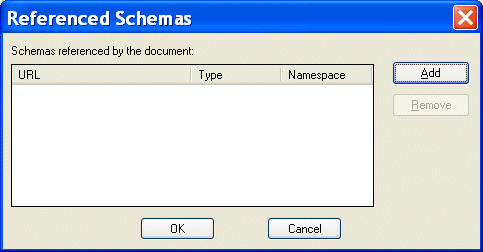
Referenced Schemas on the shortcut menu.
The Referenced Schemas dialog box appears.
3. Click the
Add button.
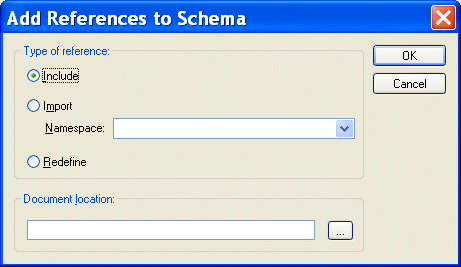
The Add References to Schema dialog box appears.
4. Specify the type of reference you want to make. If you are redefining an XML Schema, specify the namespace in the
Namespace field.
5. Specify the URL of the XML Schema you want to reference. For example:
6. Click
OK.
You are returned to the Referenced Schemas dialog box.
7. Click
OK to add the referenced XML Schema to your XML Schema.
|

Electronics & Electrical Equipment
Many electronics and electrical equipment companies need the most powerful XML IDE to power up their companies. Come see which electronics & electrical equipment companies are wired up with Stylus Studio 2006.
Building DataDirect XML Converter Applications with Stylus Studio
DataDirect XML Converters are Java and .NET components that enable access to any data (flat files, EDI) from your application code. Learn how to deploy XML applications today.
EDIFACT Sample Converted to XML
A sample EDIFACT document before and after conversion to XML, showing markup and full automatically-generated internal documentation.
XML Notepad
XML Notepad simplifies building of XML applications, allowing authors to rapidly build and edit their XML files. With XML Notepad, you can create XML document prototypes quickly, easily, using an intuitive graphical interface.