
Home > Contest Help
Locating your Stylus Studio® Installation ID
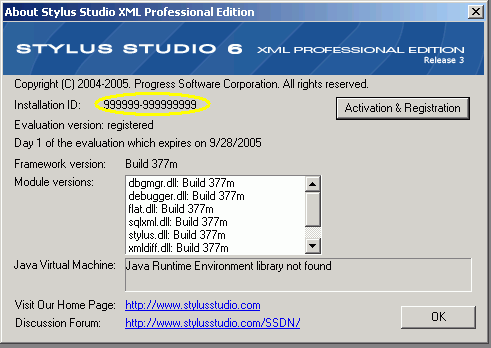
To locate your Stylus Studio® Installation ID, first open Stylus Studio and click "About Stylus Studio" from the "Help" menu. If you have not yet installed Stylus Studio, you can download a free evaluation today.
Find the sequence of numbers following the text "Installation ID" (circled). If there is no Installation ID found here, you must register and activate Stylus Studio®. You can do this by clicking the button labeled "Activation & Registration". Follow the instructions given. Once activated, the Installation ID should now appear.
Java IDE
Edit, compile and debug and generate Java code with Stylus Studio's Java Integrated Development Environment (IDE). Supports popular Java XML processing components including Apache Xalan, Apache Axis, Apache Xerces, Saxon and more.
Why XQuery - The Case for XQuery
Read "The Case for XQuery" - an article that debuted in the November 2005 issue of SOA WebServices Journal, written by Jerry King, Vice President of DataDirect Technologies.
XSD Documentation Generator
Stylus Studio®'s XSD Editor includes an integrated XSD documentation generator, allowing you to easily publish XML content models defined in XSD in a convenient, HTML format.
Mail, Package & Freight Delivery
Want to know what mail, package & freight delivery companies are shipping away there XML woes? Now you can! Check out these top mail, package & freight delivery companies that are packaged with the power of Stylus Studio.