XML Editor
Sign up for a WebBoard account Sign Up Keyword Search Search More Options... Options
Chat Rooms Chat Help Help News News Log in to WebBoard Log in Not Logged in
Conferences Close Tree View
+ Stylus Studio Feature Requests (1123)
- Stylus Studio Technical Forum (13807)
-> + Mapping multiple files within ... (7)
-> + StylusStudio vs Altova vs BizT... (4)
-> + Command line execution (7)
-> + CSS and Styling in X15 (2)
-> + Ignores debug breakpoints in X... (5)
-> + Cursor dissapearing in Text vi... (4)
-> + compile error xquery java styl... (3)
-> + Stylus Studio Setup: Applicati... (10)
-> + Stylus StudioX15 Crashing whe... (4)
-> + Upgrade Stylus 14 to 15 (2)
-> + ACE Broker Download v2.5 (2)
-> + Help creating custom convertor (7)
-> + Problem saving Documentation (5)
-> + Registry keys for Stylus x15 (8)
-> + How to add a value when conver... (10)
-> + Stylus Studio Pro & Ent X15r1 ... (2)
-> + You need to install Java 2 SDK... (2)
-> - How to disable automatic and m... (1)
-> + Does Stylus Studio / DataDirec... (4)
-> + Stylus Studio fails with 'The ... (12)
-- [1-20] [21-40] [41-60] Next
+ Website Feedback (243)
+ XSLT Help and Discussion (7447)
+ XQuery Help and Discussion (1861)
+ Stylus Studio FAQs (159)
+ Stylus Studio Code Samples & Utilities (361)
+ Stylus Studio Announcements (113)
Topic  
Postnext
Roger rogerSubject: grouping in Stylus Studio Publisher
Author: Roger roger
Date: 29 Feb 2012 11:41 AM
Hello,
We are trying Stylus Studio Publisher version for generating XSL-Fo that will display PDF. We have data something like this in the XML source file that need to be grouped and displayed.

<items>
<item>
<name>product1</name>
<category>charge</category>
<amount>8.5</amount>
</item>
<item>
<name>product12</name>
<category>usage</category>
<amount>5.5</amount>
</item>
<item>
<name>product28</name>
<category>calls</category>
<amount>5.5</amount>
</item>
<item>
<name>product29</name>
<category>usage</category>
<amount>10.0</amount>
</item>
...
</items>

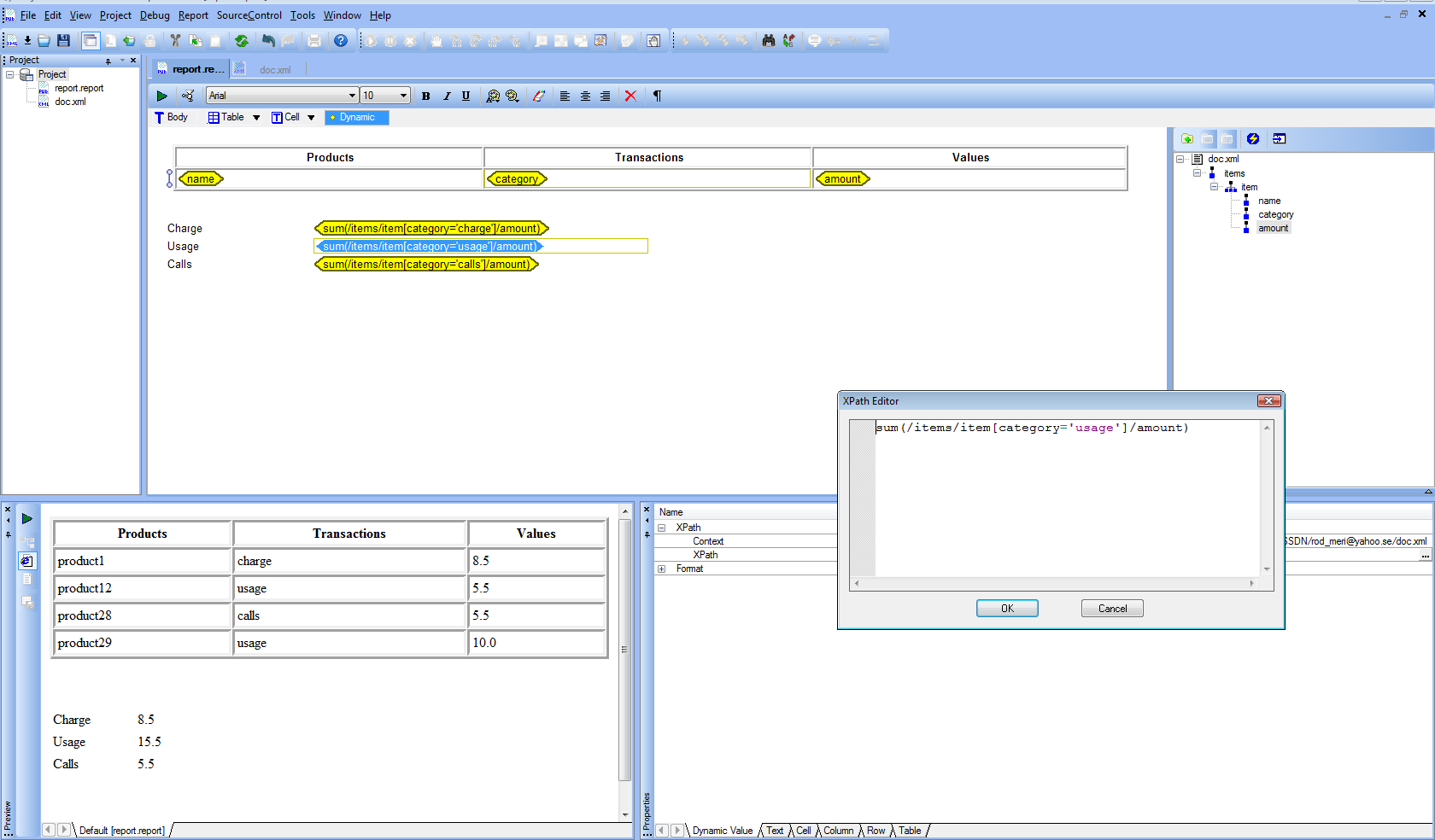
The displayed data should be the sum of Amount grouped on category, should look like this:

charge: 8.5
usage: 15.5
calls: 5.5

Can this be done with Stylus Studio publisher when working with a report? We want to avoid to need to generate the XSL-Fo code and manually add XSLT instruction to do this. Is this possible to do from the visual tool? We have been trying to do this by using diferent XPath statement in the tool but to no success. We are using the latest trial version.

Thanks in advance!

Postnext
Ivan PedruzziSubject: grouping in Stylus Studio Publisher
Author: Ivan Pedruzzi
Date: 29 Feb 2012 03:09 PM

Yes, have a look at the screenshot attached.

Ivan Pedruzzi
Stylus Studio Team

Postnext
Roger rogerSubject: grouping in Stylus Studio Publisher
Author: Roger roger
Date: 29 Feb 2012 09:55 PM
Thanks for quick response. This works fine if you in advance know the number of categories that exist in each xml data source, then you can create one row for each and display sum.
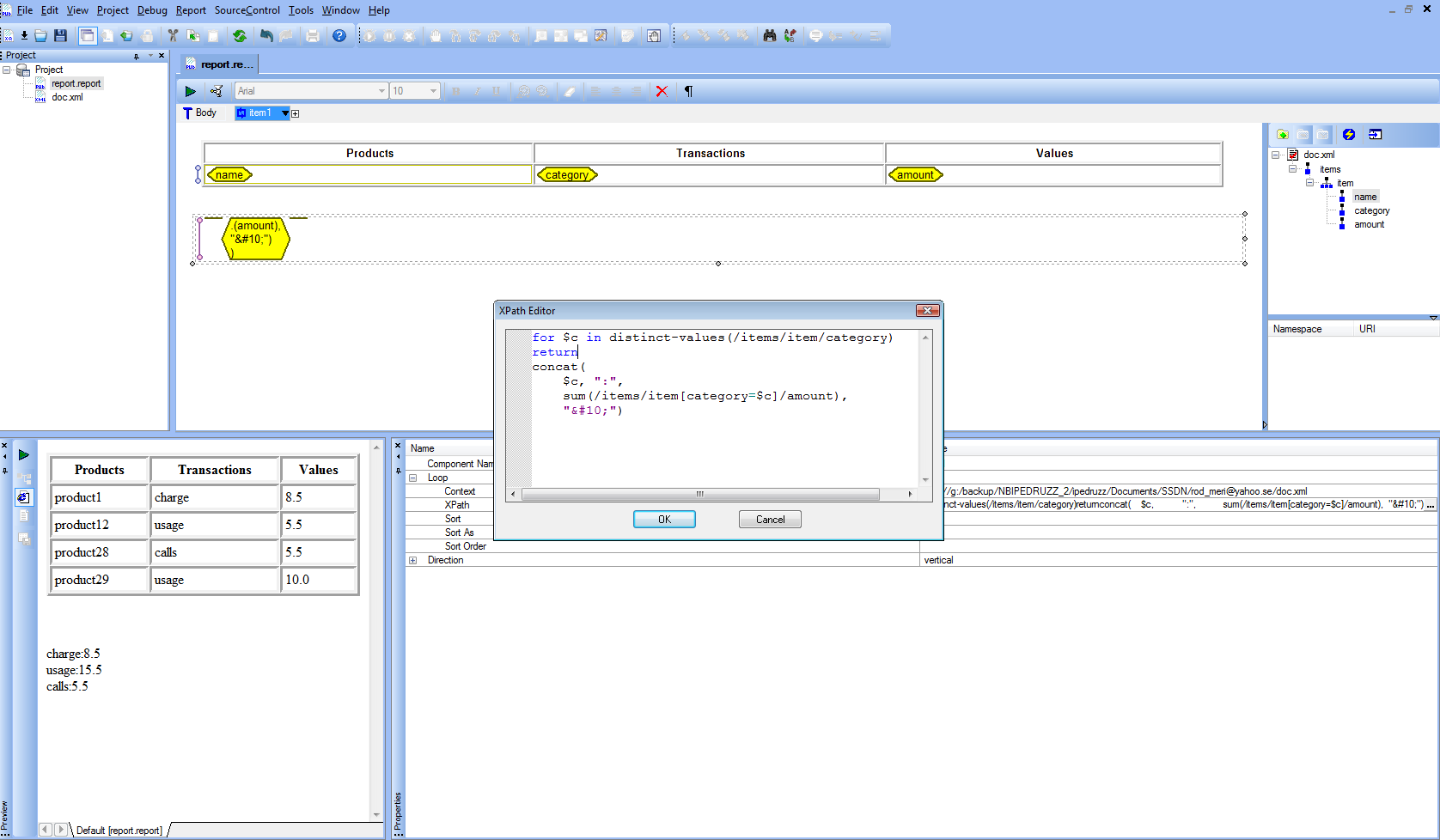
But if there is a diferent number of item categories for each xml data source, how to do to dynamic create the number of categories with its sum?

Postnext
Ivan PedruzziSubject: grouping in Stylus Studio Publisher
Author: Ivan Pedruzzi
Date: 29 Feb 2012 11:04 PM

Here is a solution that groups dynamic values.

Hope this helps
Ivan Pedruzzi
Stylus Studio Team


Documentproject.zip

Posttop
Roger rogerSubject: grouping in Stylus Studio Publisher
Author: Roger roger
Date: 01 Mar 2012 02:16 AM
Thanks! this worked

   
Download A Free Trial of Stylus Studio 6 XML Professional Edition Today! Powered by Stylus Studio, the world's leading XML IDE for XML, XSLT, XQuery, XML Schema, DTD, XPath, WSDL, XHTML, SQL/XML, and XML Mapping!  
go

Log In Options

Site Map | Privacy Policy | Terms of Use | Trademarks
Stylus Scoop XML Newsletter:
W3C Member
Stylus Studio® and DataDirect XQuery ™are from DataDirect Technologies, is a registered trademark of Progress Software Corporation, in the U.S. and other countries. © 2004-2011 All Rights Reserved.